
[win8] Windows ストア アプリでモーダルダイアログは作れるのか? | Moonmile Solutions Blog
http://www.moonmile.net/blog/archives/4030
の続きで、カスタムのモーダルダイアログができたので、晒しておきます。難点としては、ちょっとコードが強引なのと、リサイズに対応していない(縦横にしたときとか)ので、後でライブラリ的に修正するのがベターかと。
■使い方
private async void ModalClick2(object sender, RoutedEventArgs e)
{
	ModalDialog dlg = new ModalDialog();
	int n = await dlg.ShowAsync();
	textResult.Text = n.ToString();
}
MessageDialog 風に await で待ちができます。これでシーケンスが簡単になるかなと。
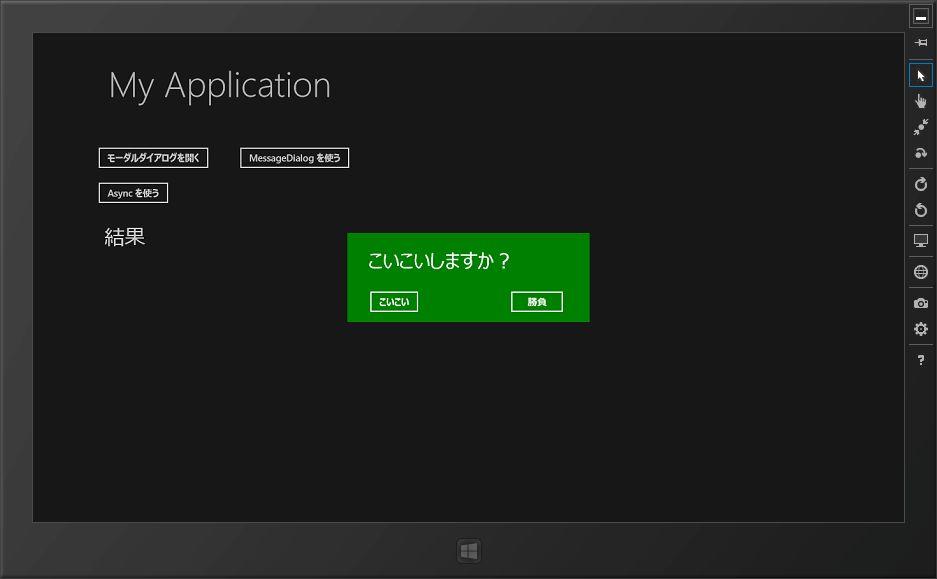
モーダルダイアログ自体は、ユーザーコントロールで作っておいて、画面に表示します。ダイアログが表示している間は、他のボタンが押せないので、実質モーダルダイアログとして働きます。
■モーダルダイアログを作る
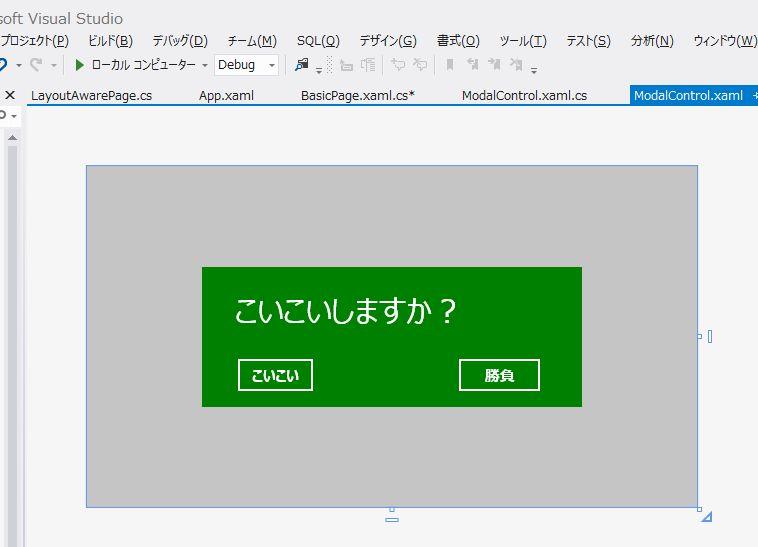
背景をかぶせる部分と、ダイアログとして表示する部分の2つの grid を作ります。
<UserControl
    x:Class="SampleModal.ModalControl"
    xmlns="http://schemas.microsoft.com/winfx/2006/xaml/presentation"
    xmlns:x="http://schemas.microsoft.com/winfx/2006/xaml"
    xmlns:local="using:SampleModal"
    xmlns:d="http://schemas.microsoft.com/expression/blend/2008"
    xmlns:mc="http://schemas.openxmlformats.org/markup-compatibility/2006"
    mc:Ignorable="d"
    d:DesignHeight="341"
    d:DesignWidth="610">
    <Grid x:Name="grid">
        <Rectangle x:Name="rect" Fill="black" Opacity=".2" />
        <Grid
          x:Name="msg"
            Background="Green"
          Width="380"
          Height="140"
          >
            <TextBlock
            FontSize="32"
            HorizontalAlignment="Left" Margin="33,27,0,0" TextWrapping="Wrap" Text="こいこいしますか?" VerticalAlignment="Top"/>
            <Button
            Click="YesClick"
            Content="こいこい" HorizontalAlignment="Left" Margin="33,89,0,0" VerticalAlignment="Top"/>
            <Button
            Click="NoClick"
            Content="勝負" HorizontalAlignment="Left" Margin="254,89,0,0" VerticalAlignment="Top" Width="87"/>

        </Grid>
    </Grid>
</UserControl>
背景のところは grid という名前を付けて、ダイアログ自身は msg という名前を付けておきます。grid のほうは、画面いっぱいに広げて他のボタンを押せなくするようにするために使います。
■モーダルダイアログのコード
モーダルダイアログ自身の ModalControl と、それを表示するための ModalDialog クラスを作っておきます。
public sealed partial class ModalControl : UserControl
{
	public ModalControl()
	{
		this.InitializeComponent();
	}

	public Action<int> OnButtonClick;
	public int Result;

	private void YesClick(object sender, RoutedEventArgs e)
	{
		if (OnButtonClick != null)
		{
			this.IsOpen = false;
			Result = 0;
			OnButtonClick(0);
		}
	}

	private void NoClick(object sender, RoutedEventArgs e)
	{
		if (OnButtonClick != null)
		{
			this.IsOpen = false;
			Result = 1;
			OnButtonClick(1);
		}
	}

	private bool _isOpen;
	public bool IsOpen
	{
		get { return _isOpen; }
		set
		{
			_isOpen = value;
			if (value)
			{
				this.Visibility = Windows.UI.Xaml.Visibility.Visible;
			}
			else
			{
				this.Visibility = Windows.UI.Xaml.Visibility.Collapsed;
			}
		}
	}
}

public class ModalDialog
{
	public ModalControl _dlg;

	public ModalDialog()
	{
		_dlg = new ModalControl();
		_dlg.OnButtonClick += OnButtonClick;

		var frame = Window.Current.Content as Frame;
		var page = frame.Content as Page;
		// ここでは Grid 固定
		// 親が Canvas の場合にも対応するべき
		var root = page.Content as Grid;
		root.Children.Add(_dlg);

		// 画面いっぱいに表示する
		double sw = Window.Current.Bounds.Width;
		double sh = Window.Current.Bounds.Height;
		_dlg.HorizontalAlignment = HorizontalAlignment.Left;
		_dlg.VerticalAlignment = VerticalAlignment.Top;
		_dlg.Margin = new Thickness(0, 0, -sw, -sh);
		_dlg.Width = sw;
		_dlg.Height = sh;
	}

	/// <summary>
	/// 通常の表示
	/// OnResult イベントをフックする
	/// </summary>
	public void Show()
	{
		_dlg.IsOpen = true;
	}

	/// <summary>
	/// 非同期に表示する
	/// </summary>
	/// <returns></returns>
	public async Task<int> ShowAsync()
	{
		_dlg.IsOpen = true;
		var n = await Task.Run( async () =>
		{
			while ( _dlg.IsOpen == true ) {
				// イベント待ち
				await Task.Delay(100);
			}
			return _dlg.Result;
		});
		return n;
	}

	public event Action<int> OnResult;
	private void OnButtonClick(int btn)
	{
		if (OnResult != null)
		{
			OnResult(btn);
		}
	}
}
ボタンのイベント待ちのところは、Awaitlbe パターン
非同期メソッドの内部実装 (C# によるプログラミング入門)
http://ufcpp.net/study/csharp/sp5_awaitable.html
を使えばいいのでしょうが、なんかうまく作れなかったので、await Task.Delay() でキーボード待ちをします。Applecation.DoEvents() と同じことができるので、まあ、これはこれでよいかと。100 msec で待てばさほど CPU に負担をかけずに済みます。ちなみに、ここを while ループだけにしてしまうと、CPU を 100% 喰ってしまいます。
■モーダルダイアログとシーケンス図の関係
で、モーダルダイアログの実装ができた訳ですが、果たして
無理矢理流れに乗せてみると意外とうまくいって無理矢理ではなかったというオチ | Moonmile Solutions Blog
http://www.moonmile.net/blog/archives/4022
のようにフォームアプリの Applcation.DoEvent の問題とか、ロジックとUIのシーケンスの問題(UMLで設計をするときの罠)が解決しているかどうかはさだかではないのですよ。ってなわけで、さらに寄り道をしてお次はこれを検証するということで。