
論理削除と物理削除の比較のためのテーブル設計がひと通りできたので、具体的にどのように使われるのかを考えてみましょう。
この手のやつは、いちばん複雑だと思われる「工場の部品受注システム」を例にとるとよいです。下手に、やさしい例をだすと何処で問題が起こるのかが分かりにくくなります。
仮説として、つぎのような反論が見つかればよいのです。
- 論理削除を使ったときに、複雑なクエリを動かしたときに破綻する。
- 物理削除を使ったときに、過去のデータが検索できなくて大変なことになる。
のどちらかが見つかればよいのです。
前者であれば、この手の複雑なデータ構造の場合には「論理削除を禁止!」できます。逆に、後者の場合では「物理削除だけでは問題が解決できない!」こととなり論理削除を採用する理由が見つかるはずです。
仮説を証明するために
1. 工場の部品受注システムのデータ構造を考える(論理削除型と物理削除型の両方)
2. 複雑なクエリあるいは手順のユースケースを考える
3. それぞれのケースで問題でクエリやコードを書いてみる
4. 問題が起こるかどうかを確認する
ということになります。
いままでは、この手のユースケースを考えたり、実際にクエリやコードを書いたりするのが大変だったのですが、今は AI エージェントがあるので簡単です。AI エージェントに「工場の部品受注システムのデータ構造」を突っ込んでおいて、SQL やコードを書いて貰えばいいのです。
で、そのコードが、人にとって読みやすいか≒人にとって書きやすいか、ということがわかればいいですよね。
逆に将来的に AI エージェントにコーディングを依存した場合に、破綻するようなデータ構造を設計するのを避けるという意味もあります。できる限り、AI が誤解しないようなデータ構造が望まれるでしょう。
データ構造
- – 部品マスター
- – 部品補助情報
- – 部品の調達先
- – 受注情報
- – 部品生産管理
- – 部品の組み合わせテーブル
- – 受注組みあわせ番号管理
- – 顧客発注履歴
論理削除型データ構造
-- 部品マスター
CREATE TABLE parts (
    id BIGINT PRIMARY KEY AUTO_INCREMENT,
    part_number VARCHAR(64) UNIQUE NOT NULL,
    part_name VARCHAR(255) NOT NULL,
    description TEXT NULL,
    unit_price DECIMAL(10, 2) NOT NULL,
    lead_time_days INT DEFAULT 0,
    created_at TIMESTAMP DEFAULT CURRENT_TIMESTAMP,
    updated_at TIMESTAMP DEFAULT CURRENT_TIMESTAMP ON UPDATE CURRENT_TIMESTAMP,
    deleted_at TIMESTAMP NULL
);

-- 部品補助情報
CREATE TABLE part_details (
    id BIGINT PRIMARY KEY AUTO_INCREMENT,
    part_id BIGINT NOT NULL,
    weight DECIMAL(10, 4) NULL,
    dimensions VARCHAR(255) NULL,
    material VARCHAR(128) NULL,
    storage_location VARCHAR(128) NULL,
    created_at TIMESTAMP DEFAULT CURRENT_TIMESTAMP,
    updated_at TIMESTAMP DEFAULT CURRENT_TIMESTAMP ON UPDATE CURRENT_TIMESTAMP,
    FOREIGN KEY (part_id) REFERENCES parts(id)
);

-- 部品の調達先
CREATE TABLE part_suppliers (
    id BIGINT PRIMARY KEY AUTO_INCREMENT,
    part_id BIGINT NOT NULL,
    supplier_id BIGINT NOT NULL,
    supplier_part_number VARCHAR(64) NULL,
    supplier_price DECIMAL(10, 2) NOT NULL,
    lead_time_days INT DEFAULT 0,
    created_at TIMESTAMP DEFAULT CURRENT_TIMESTAMP,
    updated_at TIMESTAMP DEFAULT CURRENT_TIMESTAMP ON UPDATE CURRENT_TIMESTAMP,
    FOREIGN KEY (part_id) REFERENCES parts(id),
    FOREIGN KEY (supplier_id) REFERENCES suppliers(id)
);

-- 受注情報
CREATE TABLE purchase_orders (
    id BIGINT PRIMARY KEY AUTO_INCREMENT,
    po_number VARCHAR(64) UNIQUE NOT NULL,
    supplier_id BIGINT NOT NULL,
    order_date DATE NOT NULL,
    expected_delivery_date DATE NOT NULL,
    actual_delivery_date DATE NULL,
    status ENUM('pending', 'ordered', 'received', 'cancelled') DEFAULT 'pending',
    created_at TIMESTAMP DEFAULT CURRENT_TIMESTAMP,
    updated_at TIMESTAMP DEFAULT CURRENT_TIMESTAMP ON UPDATE CURRENT_TIMESTAMP,
    FOREIGN KEY (supplier_id) REFERENCES suppliers(id)
);

-- 部品生産管理
CREATE TABLE part_production (
    id BIGINT PRIMARY KEY AUTO_INCREMENT,
    part_id BIGINT NOT NULL,
    production_date DATE NOT NULL,
    quantity_produced INT NOT NULL,
    quality_status ENUM('pass', 'fail', 'rework') DEFAULT 'pass',
    notes TEXT NULL,
    created_at TIMESTAMP DEFAULT CURRENT_TIMESTAMP,
    updated_at TIMESTAMP DEFAULT CURRENT_TIMESTAMP ON UPDATE CURRENT_TIMESTAMP,
    FOREIGN KEY (part_id) REFERENCES parts(id)
);

-- 部品の組み合わせテーブル(BOM)
CREATE TABLE bom_items (
    id BIGINT PRIMARY KEY AUTO_INCREMENT,
    bom_id BIGINT NOT NULL,
    part_id BIGINT NOT NULL,
    quantity INT NOT NULL,
    sequence INT NOT NULL,
    created_at TIMESTAMP DEFAULT CURRENT_TIMESTAMP,
    updated_at TIMESTAMP DEFAULT CURRENT_TIMESTAMP ON UPDATE CURRENT_TIMESTAMP,
    FOREIGN KEY (bom_id) REFERENCES bom(id),
    FOREIGN KEY (part_id) REFERENCES parts(id),
    UNIQUE KEY unique_bom_part (bom_id, part_id)
);

-- BOM マスター
CREATE TABLE bom (
    id BIGINT PRIMARY KEY AUTO_INCREMENT,
    product_number VARCHAR(64) UNIQUE NOT NULL,
    product_name VARCHAR(255) NOT NULL,
    version INT DEFAULT 1,
    effective_date DATE NOT NULL,
    status ENUM('active', 'obsolete') DEFAULT 'active',
    created_at TIMESTAMP DEFAULT CURRENT_TIMESTAMP,
    updated_at TIMESTAMP DEFAULT CURRENT_TIMESTAMP ON UPDATE CURRENT_TIMESTAMP,
    deleted_at TIMESTAMP NULL
);

-- 受注組み合わせ番号管理
CREATE TABLE customer_orders (
    id BIGINT PRIMARY KEY AUTO_INCREMENT,
    order_number VARCHAR(64) UNIQUE NOT NULL,
    customer_id BIGINT NOT NULL,
    bom_id BIGINT NOT NULL,
    order_date DATE NOT NULL,
    delivery_date DATE NOT NULL,
    quantity INT NOT NULL,
    status ENUM('pending', 'in_production', 'completed', 'cancelled') DEFAULT 'pending',
    created_at TIMESTAMP DEFAULT CURRENT_TIMESTAMP,
    updated_at TIMESTAMP DEFAULT CURRENT_TIMESTAMP ON UPDATE CURRENT_TIMESTAMP,
    FOREIGN KEY (customer_id) REFERENCES customers(id),
    FOREIGN KEY (bom_id) REFERENCES bom(id)
);

-- 顧客発注履歴
CREATE TABLE order_history (
    id BIGINT PRIMARY KEY AUTO_INCREMENT,
    customer_order_id BIGINT NOT NULL,
    status_changed_to VARCHAR(64) NOT NULL,
    changed_at TIMESTAMP NOT NULL,
    notes TEXT NULL,
    created_at TIMESTAMP DEFAULT CURRENT_TIMESTAMP,
    FOREIGN KEY (customer_order_id) REFERENCES customer_orders(id)
);

-- 顧客マスター
CREATE TABLE customers (
    id BIGINT PRIMARY KEY AUTO_INCREMENT,
    customer_code VARCHAR(64) UNIQUE NOT NULL,
    customer_name VARCHAR(255) NOT NULL,
    contact_person VARCHAR(128) NULL,
    phone VARCHAR(20) NULL,
    email VARCHAR(255) NULL,
    created_at TIMESTAMP DEFAULT CURRENT_TIMESTAMP,
    updated_at TIMESTAMP DEFAULT CURRENT_TIMESTAMP ON UPDATE CURRENT_TIMESTAMP
);

-- サプライヤーマスター
CREATE TABLE suppliers (
    id BIGINT PRIMARY KEY AUTO_INCREMENT,
    supplier_code VARCHAR(64) UNIQUE NOT NULL,
    supplier_name VARCHAR(255) NOT NULL,
    contact_person VARCHAR(128) NULL,
    phone VARCHAR(20) NULL,
    email VARCHAR(255) NULL,
    created_at TIMESTAMP DEFAULT CURRENT_TIMESTAMP,
    updated_at TIMESTAMP DEFAULT CURRENT_TIMESTAMP ON UPDATE CURRENT_TIMESTAMP
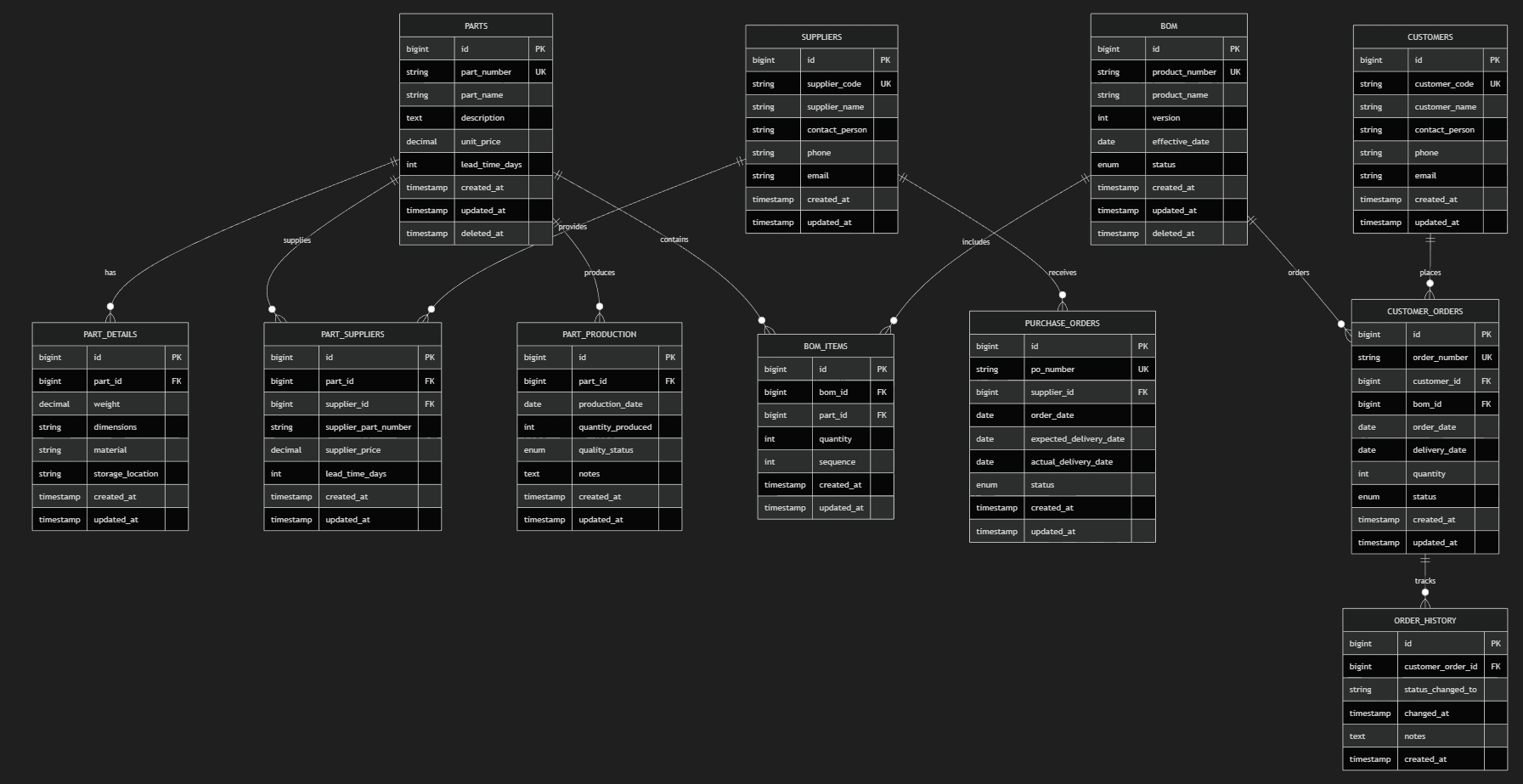
前回 Copilot に書いて貰ったデータ構造は、deleted_at カラムがある論理削除型のものでした。これは、AI が吐き出したものですから、多少の修正が必要かもしれませんが、AI がライブコーディングをしやすいデータ構造になっている筈です。
これに命題を与えていきます。
物理削除型データ構造
parts, bom テーブルに deleted_at カラムが入っているので、これを取り除きます。
さらに、parts や bom テーブルの過去のものが参照できるように、履歴用のテーブルを作って貰います。
-- 部品マスター(物理削除)
CREATE TABLE parts (
    id BIGINT PRIMARY KEY AUTO_INCREMENT,
    part_number VARCHAR(64) UNIQUE NOT NULL,
    part_name VARCHAR(255) NOT NULL,
    description TEXT NULL,
    unit_price DECIMAL(10, 2) NOT NULL,
    lead_time_days INT DEFAULT 0,
    created_at TIMESTAMP DEFAULT CURRENT_TIMESTAMP,
    updated_at TIMESTAMP DEFAULT CURRENT_TIMESTAMP ON UPDATE CURRENT_TIMESTAMP
);

-- 部品マスター履歴
CREATE TABLE parts_history (
    history_id BIGINT PRIMARY KEY AUTO_INCREMENT,
    part_id BIGINT NOT NULL,
    part_number VARCHAR(64) NOT NULL,
    part_name VARCHAR(255) NOT NULL,
    description TEXT NULL,
    unit_price DECIMAL(10, 2) NOT NULL,
    lead_time_days INT DEFAULT 0,
    version INT NOT NULL,
    effective_from TIMESTAMP NOT NULL,
    effective_to TIMESTAMP NULL,
    created_at TIMESTAMP DEFAULT CURRENT_TIMESTAMP,
    FOREIGN KEY (part_id) REFERENCES parts(id)
);

-- BOM マスター(物理削除)
CREATE TABLE bom (
    id BIGINT PRIMARY KEY AUTO_INCREMENT,
    product_number VARCHAR(64) UNIQUE NOT NULL,
    product_name VARCHAR(255) NOT NULL,
    version INT DEFAULT 1,
    effective_date DATE NOT NULL,
    status ENUM('active', 'obsolete') DEFAULT 'active',
    created_at TIMESTAMP DEFAULT CURRENT_TIMESTAMP,
    updated_at TIMESTAMP DEFAULT CURRENT_TIMESTAMP ON UPDATE CURRENT_TIMESTAMP
);

-- BOM マスター履歴
CREATE TABLE bom_history (
    history_id BIGINT PRIMARY KEY AUTO_INCREMENT,
    bom_id BIGINT NOT NULL,
    product_number VARCHAR(64) NOT NULL,
    product_name VARCHAR(255) NOT NULL,
    version INT NOT NULL,
    effective_date DATE NOT NULL,
    status ENUM('active', 'obsolete') DEFAULT 'active',
    effective_from TIMESTAMP NOT NULL,
    effective_to TIMESTAMP NULL,
    created_at TIMESTAMP DEFAULT CURRENT_TIMESTAMP,
    FOREIGN KEY (bom_id) REFERENCES bom(id)
);

-- 部品補助情報(物理削除)
CREATE TABLE part_details (
    id BIGINT PRIMARY KEY AUTO_INCREMENT,
    part_id BIGINT NOT NULL,
    weight DECIMAL(10, 4) NULL,
    dimensions VARCHAR(255) NULL,
    material VARCHAR(128) NULL,
    storage_location VARCHAR(128) NULL,
    created_at TIMESTAMP DEFAULT CURRENT_TIMESTAMP,
    updated_at TIMESTAMP DEFAULT CURRENT_TIMESTAMP ON UPDATE CURRENT_TIMESTAMP,
    FOREIGN KEY (part_id) REFERENCES parts(id)
);

-- 部品の調達先(物理削除)
CREATE TABLE part_suppliers (
    id BIGINT PRIMARY KEY AUTO_INCREMENT,
    part_id BIGINT NOT NULL,
    supplier_id BIGINT NOT NULL,
    supplier_part_number VARCHAR(64) NULL,
    supplier_price DECIMAL(10, 2) NOT NULL,
    lead_time_days INT DEFAULT 0,
    created_at TIMESTAMP DEFAULT CURRENT_TIMESTAMP,
    updated_at TIMESTAMP DEFAULT CURRENT_TIMESTAMP ON UPDATE CURRENT_TIMESTAMP,
    FOREIGN KEY (part_id) REFERENCES parts(id),
    FOREIGN KEY (supplier_id) REFERENCES suppliers(id)
);

-- 受注情報(物理削除)
CREATE TABLE purchase_orders (
    id BIGINT PRIMARY KEY AUTO_INCREMENT,
    po_number VARCHAR(64) UNIQUE NOT NULL,
    supplier_id BIGINT NOT NULL,
    order_date DATE NOT NULL,
    expected_delivery_date DATE NOT NULL,
    actual_delivery_date DATE NULL,
    status ENUM('pending', 'ordered', 'received', 'cancelled') DEFAULT 'pending',
    created_at TIMESTAMP DEFAULT CURRENT_TIMESTAMP,
    updated_at TIMESTAMP DEFAULT CURRENT_TIMESTAMP ON UPDATE CURRENT_TIMESTAMP,
    FOREIGN KEY (supplier_id) REFERENCES suppliers(id)
);

-- 部品生産管理(物理削除)
CREATE TABLE part_production (
    id BIGINT PRIMARY KEY AUTO_INCREMENT,
    part_id BIGINT NOT NULL,
    production_date DATE NOT NULL,
    quantity_produced INT NOT NULL,
    quality_status ENUM('pass', 'fail', 'rework') DEFAULT 'pass',
    notes TEXT NULL,
    created_at TIMESTAMP DEFAULT CURRENT_TIMESTAMP,
    updated_at TIMESTAMP DEFAULT CURRENT_TIMESTAMP ON UPDATE CURRENT_TIMESTAMP,
    FOREIGN KEY (part_id) REFERENCES parts(id)
);

-- 部品の組み合わせテーブル(BOM)(物理削除)
CREATE TABLE bom_items (
    id BIGINT PRIMARY KEY AUTO_INCREMENT,
    bom_id BIGINT NOT NULL,
    part_id BIGINT NOT NULL,
    quantity INT NOT NULL,
    sequence INT NOT NULL,
    created_at TIMESTAMP DEFAULT CURRENT_TIMESTAMP,
    updated_at TIMESTAMP DEFAULT CURRENT_TIMESTAMP ON UPDATE CURRENT_TIMESTAMP,
    FOREIGN KEY (bom_id) REFERENCES bom(id),
    FOREIGN KEY (part_id) REFERENCES parts(id),
    UNIQUE KEY unique_bom_part (bom_id, part_id)
);

-- 受注組み合わせ番号管理(物理削除)
CREATE TABLE customer_orders (
    id BIGINT PRIMARY KEY AUTO_INCREMENT,
    order_number VARCHAR(64) UNIQUE NOT NULL,
    customer_id BIGINT NOT NULL,
    bom_id BIGINT NOT NULL,
    order_date DATE NOT NULL,
    delivery_date DATE NOT NULL,
    quantity INT NOT NULL,
    status ENUM('pending', 'in_production', 'completed', 'cancelled') DEFAULT 'pending',
    created_at TIMESTAMP DEFAULT CURRENT_TIMESTAMP,
    updated_at TIMESTAMP DEFAULT CURRENT_TIMESTAMP ON UPDATE CURRENT_TIMESTAMP,
    FOREIGN KEY (customer_id) REFERENCES customers(id),
    FOREIGN KEY (bom_id) REFERENCES bom(id)
);

-- 顧客発注履歴(物理削除)
CREATE TABLE order_history (
    id BIGINT PRIMARY KEY AUTO_INCREMENT,
    customer_order_id BIGINT NOT NULL,
    status_changed_to VARCHAR(64) NOT NULL,
    changed_at TIMESTAMP NOT NULL,
    notes TEXT NULL,
    created_at TIMESTAMP DEFAULT CURRENT_TIMESTAMP,
    FOREIGN KEY (customer_order_id) REFERENCES customer_orders(id)
);

-- 顧客マスター(物理削除)
CREATE TABLE customers (
    id BIGINT PRIMARY KEY AUTO_INCREMENT,
    customer_code VARCHAR(64) UNIQUE NOT NULL,
    customer_name VARCHAR(255) NOT NULL,
    contact_person VARCHAR(128) NULL,
    phone VARCHAR(20) NULL,
    email VARCHAR(255) NULL,
    created_at TIMESTAMP DEFAULT CURRENT_TIMESTAMP,
    updated_at TIMESTAMP DEFAULT CURRENT_TIMESTAMP ON UPDATE CURRENT_TIMESTAMP
);

-- サプライヤーマスター(物理削除)
CREATE TABLE suppliers (
    id BIGINT PRIMARY KEY AUTO_INCREMENT,
    supplier_code VARCHAR(64) UNIQUE NOT NULL,
    supplier_name VARCHAR(255) NOT NULL,
    contact_person VARCHAR(128) NULL,
    phone VARCHAR(20) NULL,
    email VARCHAR(255) NULL,
    created_at TIMESTAMP DEFAULT CURRENT_TIMESTAMP,
    updated_at TIMESTAMP DEFAULT CURRENT_TIMESTAMP ON UPDATE CURRENT_TIMESTAMP
);
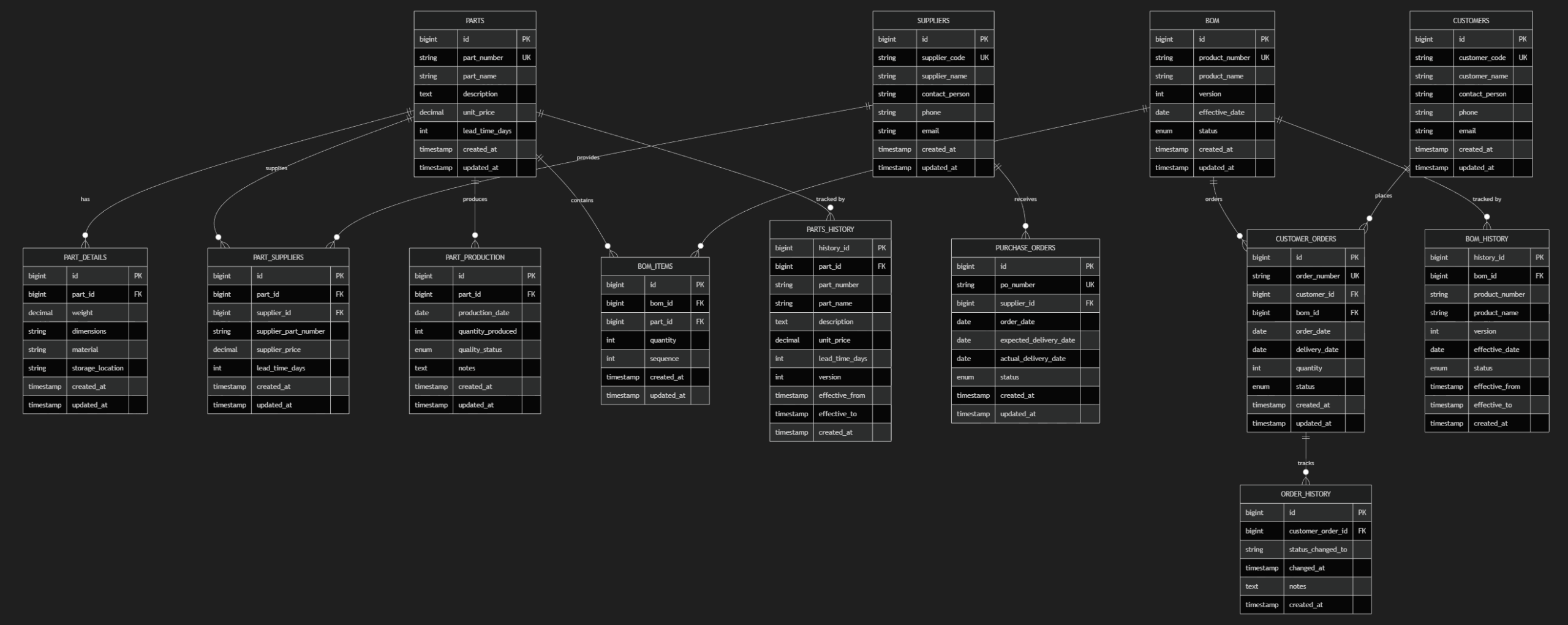
ER 図を見比べると
- PARTS_HISTORY
- BOM_HISTORY
という履歴テーブルが追加されていることが分かります。
ユースケースの検討
具体的にユースケースを考えましょう。
履歴が必要なのは、部品テーブル(parts)と部品の組み合わせテーブル(bom)です。
この2つのテーブルで、過去にさかのぼってデータを参照するパターンを考えます。
ケース1
顧客から古い発注書に基づいて部品の発注を受けた。残念ながら過去の発注のために、発注書の中にある、部品番号は現在扱っていない。この部品番号を新しくして見積もり書を作成したい。
このときに、過去の発注書と合計金額を照合して、差分を計算しておきたい。
部品A,B,C が過去の発注書にあり、部品B が廃盤になっているため、部品D に置き変えたい。
このときに、論理削除型データ構造を使ったときの SQL クエリ、あるいは、PHP/Laravel による検索結果を示してほしい。
論理削除のデータ構造の場合
Laravel/Eloquent のコードの場合は、論理削除を withTrashed メソッドを使って削除済みデータも取得できるようにします。普段の検索のときは、where を使って deleted_at is not null の条件が自動的に追加になるので、ここで混乱することはありません。
namespace App\Services;

use App\Models\CustomerOrder;
use App\Models\Bom;
use App\Models\BomItem;
use App\Models\Part;
use Illuminate\Support\Collection;

class QuoteService
{
    /**
     * @param string $orderNumber  過去の発注番号
     * @param array<string,string> $replacements  ['old_part_number' => 'new_part_number']
     */
    public function buildQuote(string $orderNumber, array $replacements): array
    {
        // 過去の発注を取得(削除済み BOM も拾うため withTrashed)
        $order = CustomerOrder::where('order_number', $orderNumber)->firstOrFail();
        $bom   = Bom::withTrashed()->findOrFail($order->bom_id);

        // BOM 明細(削除済みパーツも拾うため withTrashed)
        $items = BomItem::where('bom_id', $bom->id)->get()->map(function (BomItem $item) {
            $item->part = Part::withTrashed()->findOrFail($item->part_id);
            return $item;
        });

        $lines = [];
        $oldTotal = 0;
        $newTotal = 0;

        foreach ($items as $item) {
            $oldPart = $item->part;
            $qty     = $item->quantity;
            $newPart = $oldPart;

            // 廃盤品を代替品に差し替え
            if (isset($replacements[$oldPart->part_number])) {
                $newPart = Part::where('part_number', $replacements[$oldPart->part_number])->firstOrFail();
            }

            $lines[] = [
                'old_part_number' => $oldPart->part_number,
                'new_part_number' => $newPart->part_number,
                'quantity'        => $qty,
                'old_price'       => $oldPart->unit_price,
                'new_price'       => $newPart->unit_price,
                'old_subtotal'    => $oldPart->unit_price * $qty,
                'new_subtotal'    => $newPart->unit_price * $qty,
                'replaced'        => $oldPart->id !== $newPart->id,
            ];

            $oldTotal += $oldPart->unit_price * $qty;
            $newTotal += $newPart->unit_price * $qty;
        }

        return [
            'order_number' => $order->order_number,
            'bom_id'       => $bom->id,
            'lines'        => $lines,
            'old_total'    => $oldTotal,
            'new_total'    => $newTotal,
            'diff'         => $newTotal - $oldTotal,
        ];
    }
}
まあ、これは softDelete の機能が Laravel/Eloquent にあるので簡単に書けるという裏技みたいなものなので、同じパターンを C#/LINQ でやってみましょう。
このパターンは C# の EF Core を暫くやっていなかったので、気が付かなかったのですが、IgnoreQueryFilters メソッドがありますね。
deleted_at カラムを除外するためにあらかじめグローバルクエリフィルターを付けておけばよいそうです。
using Microsoft.EntityFrameworkCore;

public class QuoteService
{
    private readonly AppDbContext _db;

    public QuoteService(AppDbContext db) => _db = db;

    // replacements: 古い品番→新しい品番のマップ
    public async Task<QuoteResult> BuildQuoteAsync(string orderNumber, Dictionary<string, string> replacements)
    {
        var order = await _db.CustomerOrders
            .AsNoTracking()
            .FirstOrDefaultAsync(o => o.OrderNumber == orderNumber)
            ?? throw new InvalidOperationException("order not found");

        var bom = await _db.Boms
            .IgnoreQueryFilters() // deleted_at を無視して取得
            .AsNoTracking()
            .FirstOrDefaultAsync(b => b.Id == order.BomId)
            ?? throw new InvalidOperationException("bom not found");

        var items = await _db.BomItems
            .Where(i => i.BomId == bom.Id)
            .AsNoTracking()
            .ToListAsync();

        var lines = new List<QuoteLine>();
        decimal oldTotal = 0;
        decimal newTotal = 0;

        foreach (var item in items)
        {
            var oldPart = await _db.Parts
                .IgnoreQueryFilters()
                .AsNoTracking()
                .FirstOrDefaultAsync(p => p.Id == item.PartId)
                ?? throw new InvalidOperationException("part not found");

            var newPart = oldPart;
            if (replacements.TryGetValue(oldPart.PartNumber, out var newPn))
            {
                newPart = await _db.Parts
                    .AsNoTracking()
                    .FirstOrDefaultAsync(p => p.PartNumber == newPn)
                    ?? throw new InvalidOperationException("replacement not found");
            }

            var qty = item.Quantity;
            var oldSub = oldPart.UnitPrice * qty;
            var newSub = newPart.UnitPrice * qty;

            lines.Add(new QuoteLine
            {
                OldPartNumber = oldPart.PartNumber,
                NewPartNumber = newPart.PartNumber,
                Quantity = qty,
                OldPrice = oldPart.UnitPrice,
                NewPrice = newPart.UnitPrice,
                OldSubtotal = oldSub,
                NewSubtotal = newSub,
                Replaced = oldPart.Id != newPart.Id
            });

            oldTotal += oldSub;
            newTotal += newSub;
        }

        return new QuoteResult
        {
            OrderNumber = order.OrderNumber,
            BomId = bom.Id,
            Lines = lines,
            OldTotal = oldTotal,
            NewTotal = newTotal,
            Diff = newTotal - oldTotal
        };
    }
}

public record QuoteResult
{
    public string OrderNumber { get; init; }
    public long BomId { get; init; }
    public List<QuoteLine> Lines { get; init; } = new();
    public decimal OldTotal { get; init; }
    public decimal NewTotal { get; init; }
    public decimal Diff { get; init; }
}

public record QuoteLine
{
    public string OldPartNumber { get; init; }
    public string NewPartNumber { get; init; }
    public int Quantity { get; init; }
    public decimal OldPrice { get; init; }
    public decimal NewPrice { get; init; }
    public decimal OldSubtotal { get; init; }
    public decimal NewSubtotal { get; init; }
    public bool Replaced { get; init; }
}
コードファーストのときに、OnModelCreating メソッドで、HasQueryFilter を使ってグローバルクエリフィルターを設定しておきます。
protected override void OnModelCreating(ModelBuilder modelBuilder)
{
    base.OnModelCreating(modelBuilder);

    // Soft-delete 用フィルター(通常は deleted_at が NULL のみ取得)
    modelBuilder.Entity<Bom>()
        .HasQueryFilter(b => b.DeletedAt == null);

    // 他のエンティティにも必要なら同様に
    // modelBuilder.Entity<Part>().HasQueryFilter(p => p.DeletedAt == null);
}
物理削除のデータ構造の場合
今度は、物理削除のパターンです。
古い parts, bom テーブルのデータは削除されている可能性があるので、履歴テーブルから最新のものを取得する必要があります。findPartWithHistory や findPartByNumberWithHistory といったヘルパーメソッドを用意して、履歴テーブルから最新のデータを取得するようにします。
<?php

namespace App\Services;

use App\Models\CustomerOrder;
use App\Models\Bom;
use App\Models\BomItem;
use App\Models\Part;
use App\Models\PartsHistory;
use App\Models\BomHistory;
use Illuminate\Support\Facades\DB;

class QuoteService
{
    /**
     * @param string $orderNumber 過去の発注番号
     * @param array<string,string> $replacements ['old_part_number' => 'new_part_number']
     */
    public function buildQuote(string $orderNumber, array $replacements): array
    {
        return DB::transaction(function () use ($orderNumber, $replacements) {
            $order = CustomerOrder::where('order_number', $orderNumber)->firstOrFail();

            // BOM を現行テーブル優先で取得、なければ履歴から最新を取得
            $bom = Bom::find($order->bom_id)
                ?? BomHistory::where('bom_id', $order->bom_id)
                    ->orderByDesc('effective_from')
                    ->firstOrFail();

            // BOM明細は現行を想定(履歴が必要なら別途 bom_items_history を用意して同様に取得)
            $items = BomItem::where('bom_id', $order->bom_id)->get();

            $lines = [];
            $oldTotal = 0;
            $newTotal = 0;

            foreach ($items as $item) {
                $oldPart = $this->findPartWithHistory($item->part_id);
                $qty = $item->quantity;

                $newPart = $oldPart;
                if (isset($replacements[$oldPart['part_number']])) {
                    $newPart = $this->findPartByNumberWithHistory($replacements[$oldPart['part_number']]);
                }

                $oldSub = $oldPart['unit_price'] * $qty;
                $newSub = $newPart['unit_price'] * $qty;

                $lines[] = [
                    'old_part_number' => $oldPart['part_number'],
                    'new_part_number' => $newPart['part_number'],
                    'quantity'        => $qty,
                    'old_price'       => $oldPart['unit_price'],
                    'new_price'       => $newPart['unit_price'],
                    'old_subtotal'    => $oldSub,
                    'new_subtotal'    => $newSub,
                    'replaced'        => $oldPart['id'] !== $newPart['id'] || $oldPart['part_number'] !== $newPart['part_number'],
                ];

                $oldTotal += $oldSub;
                $newTotal += $newSub;
            }

            return [
                'order_number' => $order->order_number,
                'bom_id'       => $order->bom_id,
                'lines'        => $lines,
                'old_total'    => $oldTotal,
                'new_total'    => $newTotal,
                'diff'         => $newTotal - $oldTotal,
            ];
        });
    }

    private function findPartWithHistory(int $partId): array
    {
        $part = Part::find($partId);
        if ($part) {
            return $part->toArray();
        }

        $hist = PartsHistory::where('part_id', $partId)
            ->orderByDesc('effective_from')
            ->firstOrFail();

        return [
            'id'          => $hist->part_id,
            'part_number' => $hist->part_number,
            'unit_price'  => $hist->unit_price,
        ];
    }

    private function findPartByNumberWithHistory(string $partNumber): array
    {
        $part = Part::where('part_number', $partNumber)->first();
        if ($part) {
            return $part->toArray();
        }

        $hist = PartsHistory::where('part_number', $partNumber)
            ->orderByDesc('effective_from')
            ->firstOrFail();

        return [
            'id'          => $hist->part_id,
            'part_number' => $hist->part_number,
            'unit_price'  => $hist->unit_price,
        ];
    }
}
普段は where メソッドを使って parts, bom テーブルから検索するので、特に問題はでません。過去部品だったときに、findPartWithHistory や findPartByNumberWithHistory メソッドを使って履歴テーブルから最新のデータを取得するようにしています。
このケースの場合は「過去から読み取る可能性がある」ことが前提になっているので、withTrashed を使うか findPartWithHistory メソッドのようなヘルパーメソッドを使うかという判断はコーディング時に判明しそうです。
同じパターンを C#/LINQ でやってみましょう。
LINQ の場合は、IgnoreQueryFilters メソッドは使わずに、履歴テーブル(BomHistory、PartsHistory)へのアクセスで過去データの照合を行います。
// 物理削除+履歴テーブルでケース1を処理する C#/EF Core サービス例
using Microsoft.EntityFrameworkCore;

public class QuoteService
{
    private readonly AppDbContext _db;
    public QuoteService(AppDbContext db) => _db = db;

    // replacements: 古い品番→新しい品番
    public async Task<QuoteResult> BuildQuoteAsync(string orderNumber, Dictionary<string, string> replacements)
    {
        var order = await _db.CustomerOrders
            .AsNoTracking()
            .FirstOrDefaultAsync(o => o.OrderNumber == orderNumber)
            ?? throw new InvalidOperationException("order not found");

        // BOM は現行優先、無ければ履歴から最新を取得
        var bom = await _db.Boms.AsNoTracking()
                     .FirstOrDefaultAsync(b => b.Id == order.BomId)
                 ?? await _db.BomHistory.AsNoTracking()
                     .Where(h => h.BomId == order.BomId)
                     .OrderByDescending(h => h.EffectiveFrom)
                     .Select(h => new Bom { Id = h.BomId, ProductNumber = h.ProductNumber, ProductName = h.ProductName })
                     .FirstOrDefaultAsync()
                 ?? throw new InvalidOperationException("bom not found");

        // BOM 明細は現行を想定(履歴が必要なら bom_items_history も同様にフォールバック)
        var items = await _db.BomItems
            .Where(i => i.BomId == order.BomId)
            .AsNoTracking()
            .ToListAsync();

        var lines = new List<QuoteLine>();
        decimal oldTotal = 0, newTotal = 0;

        foreach (var item in items)
        {
            var oldPart = await FindPartWithHistoryAsync(item.PartId);
            var qty = item.Quantity;

            var newPart = oldPart;
            if (replacements.TryGetValue(oldPart.PartNumber, out var newPn))
            {
                newPart = await FindPartByNumberWithHistoryAsync(newPn);
            }

            var oldSub = oldPart.UnitPrice * qty;
            var newSub = newPart.UnitPrice * qty;

            lines.Add(new QuoteLine
            {
                OldPartNumber = oldPart.PartNumber,
                NewPartNumber = newPart.PartNumber,
                Quantity = qty,
                OldPrice = oldPart.UnitPrice,
                NewPrice = newPart.UnitPrice,
                OldSubtotal = oldSub,
                NewSubtotal = newSub,
                Replaced = oldPart.Id != newPart.Id || oldPart.PartNumber != newPart.PartNumber
            });

            oldTotal += oldSub;
            newTotal += newSub;
        }

        return new QuoteResult
        {
            OrderNumber = order.OrderNumber,
            BomId = bom.Id,
            Lines = lines,
            OldTotal = oldTotal,
            NewTotal = newTotal,
            Diff = newTotal - oldTotal
        };
    }

    private async Task<PartDto> FindPartWithHistoryAsync(long partId)
    {
        var part = await _db.Parts.AsNoTracking().FirstOrDefaultAsync(p => p.Id == partId);
        if (part != null) return new PartDto(part);

        var hist = await _db.PartsHistory.AsNoTracking()
            .Where(h => h.PartId == partId)
            .OrderByDescending(h => h.EffectiveFrom)
            .FirstOrDefaultAsync()
            ?? throw new InvalidOperationException("part not found");

        return new PartDto(hist.PartId, hist.PartNumber, hist.UnitPrice);
    }

    private async Task<PartDto> FindPartByNumberWithHistoryAsync(string partNumber)
    {
        var part = await _db.Parts.AsNoTracking().FirstOrDefaultAsync(p => p.PartNumber == partNumber);
        if (part != null) return new PartDto(part);

        var hist = await _db.PartsHistory.AsNoTracking()
            .Where(h => h.PartNumber == partNumber)
            .OrderByDescending(h => h.EffectiveFrom)
            .FirstOrDefaultAsync()
            ?? throw new InvalidOperationException("replacement not found");

        return new PartDto(hist.PartId, hist.PartNumber, hist.UnitPrice);
    }
}

public record QuoteResult
{
    public string OrderNumber { get; init; }
    public long BomId { get; init; }
    public List<QuoteLine> Lines { get; init; } = new();
    public decimal OldTotal { get; init; }
    public decimal NewTotal { get; init; }
    public decimal Diff { get; init; }
}

public record QuoteLine
{
    public string OldPartNumber { get; init; }
    public string NewPartNumber { get; init; }
    public int Quantity { get; init; }
    public decimal OldPrice { get; init; }
    public decimal NewPrice { get; init; }
    public decimal OldSubtotal { get; init; }
    public decimal NewSubtotal { get; init; }
    public bool Replaced { get; init; }
}

public record PartDto
{
    public PartDto(Part p) : this(p.Id, p.PartNumber, p.UnitPrice) { }
    public PartDto(long id, string partNumber, decimal unitPrice)
    {
        Id = id; PartNumber = partNumber; UnitPrice = unitPrice;
    }
    public long Id { get; }
    public string PartNumber { get; }
    public decimal UnitPrice { get; }
}
履歴テーブルを参照する分だけ、物理削除の C#/LINQ のコードの方が長くはなりますが、明示的に BomHistory や PartsHistory を参照しているので、コードを読んだときに「過去データを参照している」ことが分かりやすいという利点があります。
ケース2
もうひとつケースを考えてみましょう。
客先から発注書を受けたが、発注書に記載されている部品番号をシステムで検索すると出て来ない。どうやら、以前の見積もりを出した時には、調達可能だったもので組み合わせ番号を作成していたのだが、その後に廃盤になってしまったらしい。組み合わせ番号の整備が追い付かず、部品の組み合わせのほうが有効になっているが、部品番号を調べると画面に出て来ないという状況になってしまっている。
発注書に組み合わせ番号が書いてあったときに、その組み合わせに含まれる部品番号が有効であるかどうかのチェックを行いたい。1回目のチェックでは、現状調達できる部品だけでチェックをするが、2回目のチェックでは、履歴テーブルも参照して、過去に存在した部品番号も含めてチェックを行いたい。
1回目と2回目のチェックのメソッドを作成して欲しい。
入力は customer_orders.order_number としたい。
論理削除のデータ構造の場合
この場合は、1回目が現行のテーブルで確認。ここで存在しないので、確認のために2回目で履歴を探すという二段階の流れになります。
namespace App\Services;

use App\Models\CustomerOrder;
use App\Models\Bom;
use App\Models\BomItem;
use App\Models\Part;

class BomCheckService
{
    // 現行のみ(deleted_at IS NULL)
    public function checkCurrentByOrder(string $orderNumber): array
    {
        $order = CustomerOrder::where('order_number', $orderNumber)->firstOrFail();
        $bom   = Bom::findOrFail($order->bom_id);

        $partIds   = BomItem::where('bom_id', $bom->id)->pluck('part_id')->all();
        $existing  = Part::whereIn('id', $partIds)->pluck('id')->all(); // 現行のみ
        $missingId = array_values(array_diff($partIds, $existing));
        $missingPn = Part::withTrashed()->whereIn('id', $missingId)->pluck('part_number')->all();

        return [
            'bom_id'  => $bom->id,
            'missing' => $missingPn,
        ];
    }

    // 履歴も含める(withTrashed で論理削除を許容)
    public function checkWithHistoryByOrder(string $orderNumber): array
    {
        $order = CustomerOrder::where('order_number', $orderNumber)->firstOrFail();
        $bom   = Bom::withTrashed()->findOrFail($order->bom_id);

        $partIds   = BomItem::where('bom_id', $bom->id)->pluck('part_id')->all();
        $allParts  = Part::withTrashed()->whereIn('id', $partIds)->get(['id','part_number','deleted_at']);
        $foundIds  = $allParts->pluck('id')->all();
        $missingId = array_values(array_diff($partIds, $foundIds));

        $foundInHistory = $allParts->filter(fn($p) => $p->deleted_at !== null)
                                   ->pluck('part_number')->all();
        $unknownPn = Part::withTrashed()->whereIn('id', $missingId)->pluck('part_number')->all();

        return [
            'bom_id'           => $bom->id,
            'missing'          => $unknownPn,      // 現行にも履歴にも無い
            'found_in_history' => $foundInHistory, // 論理削除済み(過去存在)
        ];
    }
}
物理削除のデータ構造の場合
こっちは、BomHistory, PartsHistory を参照して履歴を確認する必要があります。
両方の構造を見ると、論理削除でも物理削除でもあまり変わらないコードになっているので、コードの記述レベルでは、どちらを選んでもよさそうな気がします。
ただ、このテーブル構造の場合は、customer_orders と parts テーブルがやや近いところにあるので、そこだけ見れば構造が分かりやすいためとも言えますね。
namespace App\Services;

use App\Models\CustomerOrder;
use App\Models\Bom;
use App\Models\BomHistory;
use App\Models\BomItem;
use App\Models\Part;
use App\Models\PartsHistory;

class BomCheckService
{
    // 1回目: 現行のみ(物理削除なので履歴は見ない)
    public function checkCurrentByOrder(string $orderNumber): array
    {
        $order = CustomerOrder::where('order_number', $orderNumber)->firstOrFail();
        $bom   = Bom::findOrFail($order->bom_id);

        $partIds   = BomItem::where('bom_id', $bom->id)->pluck('part_id')->all();
        $existing  = Part::whereIn('id', $partIds)->pluck('id')->all();
        $missingId = array_values(array_diff($partIds, $existing));
        $missingPn = PartsHistory::whereIn('part_id', $missingId)
                        ->orderBy('effective_from', 'desc')
                        ->pluck('part_number')
                        ->unique()
                        ->values()
                        ->all();

        return [
            'bom_id'  => $bom->id,
            'missing' => $missingPn, // 現行テーブルに無い部品番号
        ];
    }

    // 2回目: 履歴も含めて存在確認(parts_history / bom_history を参照)
    public function checkWithHistoryByOrder(string $orderNumber): array
    {
        $order = CustomerOrder::where('order_number', $orderNumber)->firstOrFail();

        // BOM: 現行優先、無ければ履歴の最新を採用
        $bom = Bom::find($order->bom_id)
            ?? BomHistory::where('bom_id', $order->bom_id)
                ->orderByDesc('effective_from')
                ->firstOrFail();

        $partIds = BomItem::where('bom_id', $order->bom_id)->pluck('part_id')->all();

        // 現行 + 履歴
        $current = Part::whereIn('id', $partIds)->get(['id','part_number']);
        $hist    = PartsHistory::whereIn('part_id', $partIds)
                     ->orderByDesc('effective_from')
                     ->get(['part_id','part_number']);

        $foundIds = $current->pluck('id')->all();
        $histIds  = $hist->pluck('part_id')->all();
        $missingId = array_values(array_diff($partIds, array_unique(array_merge($foundIds, $histIds))));

        $foundInHistory = $hist->pluck('part_number')->unique()->values()->all();
        $unknownPn      = PartsHistory::whereIn('part_id', $missingId)
                               ->orderByDesc('effective_from')
                               ->pluck('part_number')
                               ->unique()
                               ->values()
                               ->all();

        return [
            'bom_id'           => $bom->id,
            'missing'          => $unknownPn,      // 現行にも履歴にも無い
            'found_in_history' => $foundInHistory, // 履歴で存在した部品番号
        ];
    }
}
これだけだと、双方で差異がみられないので、引き続き。