
最終的には Python か VB あたりで動かしたいのですが、ちょっと寄り道。
Python コードを書くときに型チェックが出来なくて困っています…と言いますか、Python の場場合にはプログラミングをするときにプロパティ名とかメソッド名とかどうやって補完しているのでしょうか?
*.pyi でスタブを作る
LibreOffice の UNO API は戻り値が Any なのでコード補完が効きません。多分、戻り値が object なので、そういう仕様になっているのでしょうが、コードを書くときに面倒です。というか、どのメソッドを呼び出せるのか実行時にしかわかりません。
ひょっとしてメソッド名を全部覚えているのか? とも思わなくもないのですが、もっと敷居を下げておきたいです。自分のためにも。
おそらく、C++、Java で UNO API を使うためには大量のインターフェースを定義してあるはずです。
from typing import TYPE_CHECKING, Protocol, cast, Any

class XCell(Protocol):
    def getString(self) -> str: ...
    def setString(self, value: str) -> None: ...
    def getFormula(self) -> str: ...
    def setFormula(self, formula: str) -> None: ...
    def getValue(self) -> float: ...
    def setValue(self, value: float) -> None: ...

class XCellRange(Protocol):
    def getCellByPosition(self, column: int, row: int) -> XCell: ...
    def getCellRangeByPosition(self, startColumn: int, startRow: int, endColumn: int, endRow: int) -> 'XCellRange': ...
    def getCellRangesByName (self, aRangeName: str) -> tuple['XCellRange', ...]: ...
    def getRangeAddress(self) -> CellRangeAddress: ...

class XNameAccess(Protocol):
    def getByName(self, name: str) -> XComponent: ...
    def hasByName(self, name: str) -> bool: ...
    def getElementNames(self) -> tuple[str, ...]: ...
    def getEmbeddedObject(self) -> XChartDocument: ...

class XChartDocument(Protocol):
    def setDiagram(self, diagram: XDiagram) -> None: ...
    def createInstance(self, serviceName: str) -> Any: ...

class XDiagram (Protocol):
    pass

class XTableCharts(Protocol):
    def addNewByName(self, name: str, aRect: Any, aRanges: tuple[str, ...], bColumnHeaders: bool, bRowHeaders: bool) -> None: ...
    def hasByName(self, name: str) -> bool: ...
    def removeByName(self, name: str) -> None: ...
    def getByName(self, name: str) -> XNameAccess: ...
...
こんな感じで calc.pyi というスタブを作っておいて、本体のコードで参照させます。
import uno
import re
from typing import Any, TYPE_CHECKING, cast

# typings/calc.pyi は型チェック専用に読み込む(実行時はフォールバック)
if TYPE_CHECKING:
	from calc import XDesktop, XComponent, XSpreadsheet, XCellRange, Rectangle  # type: ignore
else:
	XDesktop = XComponent = XSpreadsheet = XCellRange = Rectangle = Any

"""
棒グラフを作成するスクリプト
"""


def connect_to_libreoffice() -> tuple[XDesktop, XComponent, XSpreadsheet]:
	"""LibreOffice に接続してアクティブな Calc シートを取得する"""
	local_ctx = uno.getComponentContext()
	resolver = local_ctx.ServiceManager.createInstanceWithContext(
		"com.sun.star.bridge.UnoUrlResolver", local_ctx)
	ctx = resolver.resolve(
		"uno:socket,host=localhost,port=2002;urp;StarOffice.ComponentContext")
	smgr = ctx.ServiceManager
	desktop : XDesktop = smgr.createInstanceWithContext("com.sun.star.frame.Desktop", ctx)

	model = desktop.getCurrentComponent()
	if model is None:
		raise RuntimeError("LibreOffice Calc ドキュメントが開かれていません")

	sheet = model.getCurrentController().getActiveSheet()
	return desktop, model, sheet
if TYPE_CHECKING のところで、コーディング時と実行時の切り替えをしなといけないのが面倒なのですが、これで Any となっている型を無理矢理 XCellRange などの型に変えることができます。
本来は、cast 関数を使って正式にキャストをすればいいのですが、どうせ Any からのキャストでしかないので、変数の型だけ決めて、そこに無理やり押しこみます。
desktop : XDesktop = smgr.createInstanceWithContext("com.sun.star.frame.Desktop", ctx)
実行時の型チェックではなくて、あくまでコーディング時のコード補完のためなのでこれで十分です。
pyi のスタブはどう作るのか?
UNO API のクラスは膨大にあって、ちまちま手作業で変換するのは大変です。いや、そもそも使いたいのは Calc 関係だけなので、全部を変換するのは大袈裟だし、手間がかかります。
基本は AI エージェントにコードを作って貰うつもりなので、すべての型が必要なわけではありません。ちょっと手直しをするとか、数行のマクロコードを書くときにコード補完ができればよいのです。
C++ や Java のライブラリを利用すればいいのでは?
UNO API のインターフェースは、Python だけではありません。C++ や Java からも使うことができます。ドキュメントは非常に少ないですが、C# から、つまり .NET からのアクセスも可能となっています。
Copilot に聞くと unoidl.dll というのがあるそうです(実際にはありません。後述するように、cli_oootypes.dll 等のファイル名に変わっています)。これをうまく使えば自動生成ができるかもしれませんね。
SDK をインストールする
ここでは、他のドキュメントを見るために SDK をインストールしていますが、実行時には必要ありません。C# の場合は、適当な *.dll を実行ファイルと一緒のフォルダーに入れることになるので、客先の PC に SDK を入れなくてもよいです。
SDK and Sourcecode
https://www.libreoffice.org/download/download-libreoffice
これをインストールすると LibreOffice のマクロドキュメントなどがインストールされます。
フォルダー名は C:\Program Files\LibreOffice\sdk\ です。
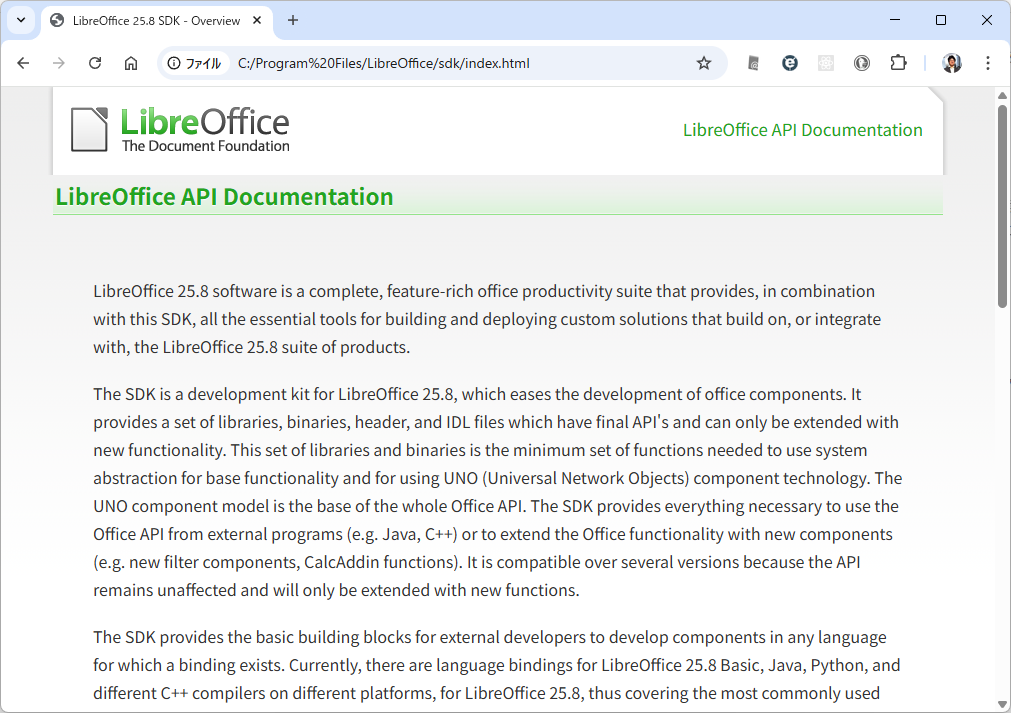
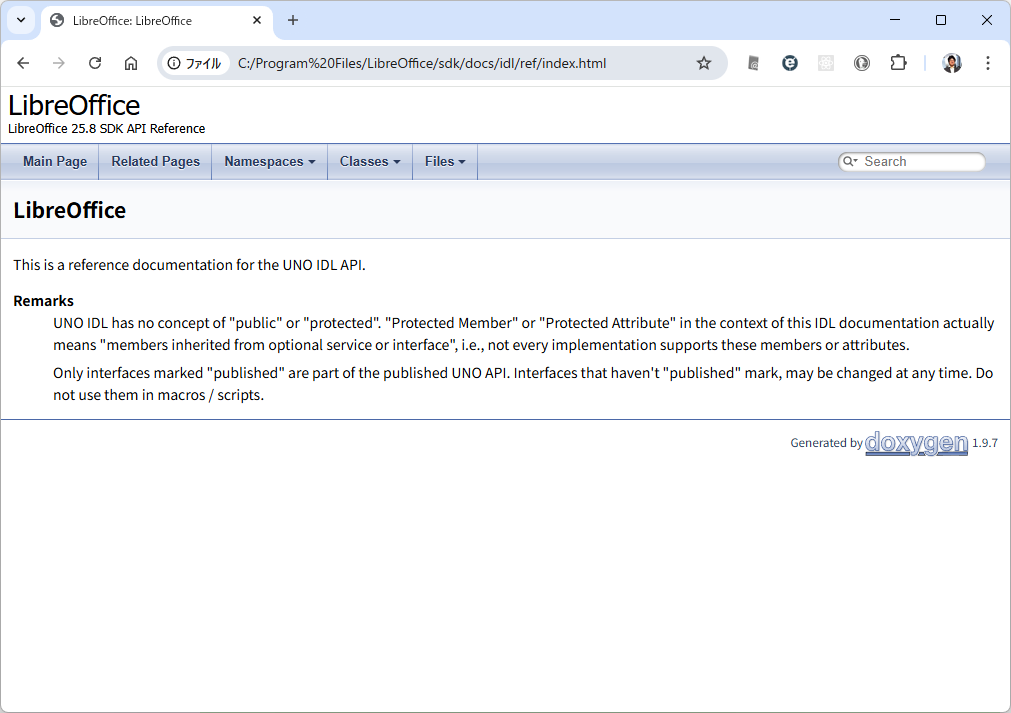
IDL リファレンスは本家 https://api.libreoffice.org/ にアクセスすると重たくて仕方がないので、ローカル PC に入れて検索すると良いです。懐かしの doxygen による自動生成です。
C# でプロジェクト参照する
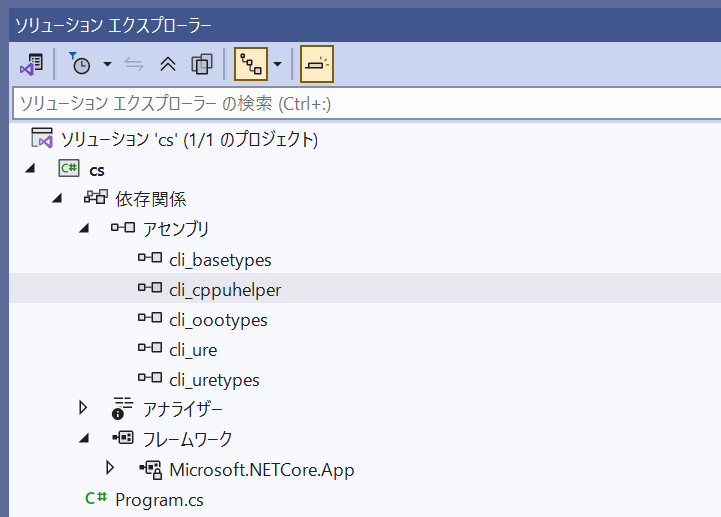
適当なプロジェクトを作って、C:\Program Files\LibreOffice\sdk\cli\ にある *.dll をプロジェクトから参照します。
主に cli_oootypes に各種のクラス定義が入っています。
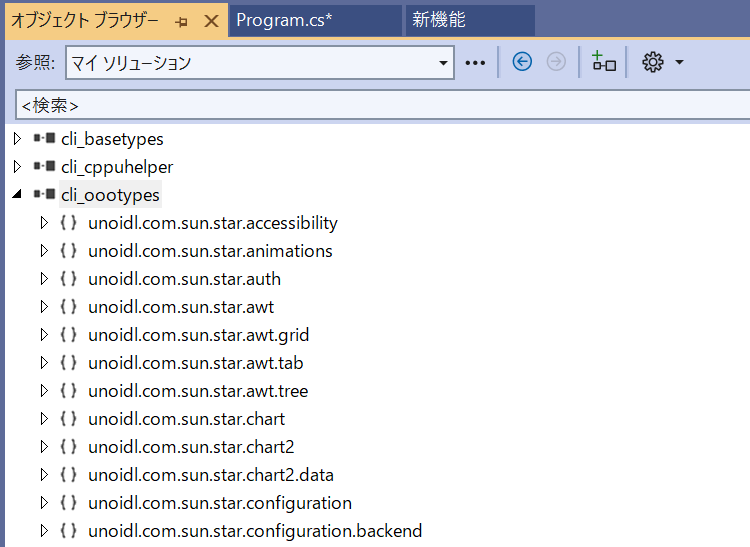
これをうまくピックアップしながら *.pyi のスタブファイルを作っていけばよいわけです。
これは今後の課題。
おまけとして、C# でアクセスできるのか?
結論から言うと現状の 25.8.3 では動作しません。これは .NET 関係で作られているラッパーがおかしいのか、プログラムがおかしいのか不明ですが、UNO API サーバーに繋がりません。
using System;
using System.Diagnostics;
using uno;
using uno.util;
using unoidl.com.sun.star.bridge;
using unoidl.com.sun.star.container;
using unoidl.com.sun.star.frame;
using unoidl.com.sun.star.lang;
using unoidl.com.sun.star.sheet;
using unoidl.com.sun.star.table;
using unoidl.com.sun.star.text;
using unoidl.com.sun.star.uno;
using unoidl.com.sun.star.beans;

class Program
{
    static void Main()
    {
        try
        {
            Console.WriteLine("Starting...");
            string[] programPathCandidates =
            {
                @"C:\\Program Files\\LibreOffice\\program",
                @"C:\\Program Files (x86)\\LibreOffice\\program"
            };

            string? libreOfficeProgramPath = null;
            foreach (var p in programPathCandidates)
            {
                if (System.IO.Directory.Exists(p))
                {
                    libreOfficeProgramPath = p;
                    break;
                }
            }

            if (libreOfficeProgramPath == null)
            {
                Console.WriteLine("LibreOffice program folder not found. Please adjust path.");
                foreach (var p in programPathCandidates)
                {
                    Console.WriteLine($"Tried: {p}");
                }
                return;
            }

            Console.WriteLine($"UNO_PATH target: {libreOfficeProgramPath}");

            // Ensure UNO can locate LibreOffice binaries.
            Environment.SetEnvironmentVariable("UNO_PATH", libreOfficeProgramPath, EnvironmentVariableTarget.Process);
            var bootstrapIni = System.IO.Path.Combine(libreOfficeProgramPath, "fundamental.ini");
            Environment.SetEnvironmentVariable("URE_BOOTSTRAP", $"vnd.sun.star.pathname:{bootstrapIni}", EnvironmentVariableTarget.Process);

            string ureBin = System.IO.Path.Combine(libreOfficeProgramPath, "..\\URE\\bin");
            string newPathSegment = libreOfficeProgramPath + ";" + ureBin;

            string? currentPath = Environment.GetEnvironmentVariable("PATH") ?? string.Empty;
            if (!currentPath.Contains(libreOfficeProgramPath, StringComparison.OrdinalIgnoreCase) || !currentPath.Contains(ureBin, StringComparison.OrdinalIgnoreCase))
            {
                Environment.SetEnvironmentVariable("PATH", newPathSegment + ";" + currentPath, EnvironmentVariableTarget.Process);
            }

            Environment.SetEnvironmentVariable("UNO_SERVICES", System.IO.Path.Combine(libreOfficeProgramPath, "uno_services.rdb"), EnvironmentVariableTarget.Process);

            // Some environments need the working directory inside the LibreOffice program folder.
            Environment.CurrentDirectory = libreOfficeProgramPath;

            // Start (or reuse) LibreOffice headless with a socket connector.
            var sofficePath = System.IO.Path.Combine(libreOfficeProgramPath, "soffice.exe");
            var acceptArg = "--accept=socket,host=localhost,port=2002;urp;StarOffice.ServiceManager";

            if (!System.IO.File.Exists(sofficePath))
            {
                Console.WriteLine($"soffice.exe not found at {sofficePath}");
                return;
            }

            bool sofficeRunning = Process.GetProcessesByName("soffice.bin").Length > 0;
            if (!sofficeRunning)
            {
                Console.WriteLine("Starting soffice headless...");
                var psi = new ProcessStartInfo
                {
                    FileName = sofficePath,
                    Arguments = $"--headless --nologo --norestore --nodefault {acceptArg}",
                    UseShellExecute = false,
                    CreateNoWindow = true,
                    WorkingDirectory = libreOfficeProgramPath
                };
                Process.Start(psi);
                // Give soffice time to open the socket.
                System.Threading.Thread.Sleep(TimeSpan.FromSeconds(5));
            }

            Console.WriteLine("Creating initial UNO context...");
            XComponentContext localContext = Bootstrap.defaultBootstrap_InitialComponentContext();
            XMultiComponentFactory localSmgr = localContext.getServiceManager();
            XUnoUrlResolver resolver = (XUnoUrlResolver)localSmgr.createInstanceWithContext("com.sun.star.bridge.UnoUrlResolver", localContext);

            Console.WriteLine("Resolving remote context via socket...");
            XComponentContext remoteContext = (XComponentContext)resolver.resolve("uno:socket,host=localhost,port=2002;urp;StarOffice.ComponentContext");

            XMultiComponentFactory serviceManager = remoteContext.getServiceManager();
            XDesktop? desktop = serviceManager.createInstanceWithContext("com.sun.star.frame.Desktop", remoteContext) as XDesktop;
            if (desktop == null)
            {
                Console.WriteLine("Failed to acquire LibreOffice desktop.");
                return;
            }

            Console.WriteLine("Desktop acquired");

            XComponentLoader? loader = desktop as XComponentLoader;
            if (loader == null)
            {
                Console.WriteLine("Failed to acquire component loader.");
                return;
            }

            Console.WriteLine("Component loader OK");

            // Reuse the active Calc document, or create a new one if none is open.
            Console.WriteLine("Checking current component...");
            XSpreadsheetDocument? calcDocument = desktop.getCurrentComponent() as XSpreadsheetDocument;
            if (calcDocument == null)
            {
                Console.WriteLine("No active Calc. Creating new...");
                var args = Array.Empty<PropertyValue>();
                var component = loader.loadComponentFromURL("private:factory/scalc", "_blank", 0, args);
                calcDocument = component as XSpreadsheetDocument;
            }

            if (calcDocument == null)
            {
                Console.WriteLine("No Calc document available.");
                return;
            }

            Console.WriteLine("Calc document ready");

            // Access the first sheet and write text to cell A1.
            XSpreadsheets sheets = calcDocument.getSheets();
            XIndexAccess sheetAccess = (XIndexAccess)sheets;
            Any sheetAny = (Any)sheetAccess.getByIndex(0);
            XSpreadsheet? sheet = sheetAny.Value as XSpreadsheet;
            if (sheet == null)
            {
                Console.WriteLine("Failed to access the first sheet.");
                return;
            }

            Console.WriteLine("Sheet acquired");

            XCell cell = sheet.getCellByPosition(0, 0);
            cell.setFormula("Hello by C#");

            Console.WriteLine("Value written to A1.");
        }
        catch (System.Exception ex)
        {
            Console.WriteLine($"Failed to write to Calc: {ex.Message}");
            Console.WriteLine(ex);
        }
    }
}
結果
PS H:\LibreOffice\net-ref> dotnet run
Starting...
UNO_PATH target: C:\\Program Files\\LibreOffice\\program
Creating initial UNO context...
Failed to write to Calc: External component has thrown an exception.
System.Runtime.InteropServices.SEHException (0x80004005): External component has thrown an exception.
   at cppu.defaultBootstrap_InitialComponentContext(Reference<com::sun::star::uno::XComponentContext>*)
   at uno.util.Bootstrap.defaultBootstrap_InitialComponentContext(String ini_file, IDictionaryEnumerator bootstrap_parameters)
   at uno.util.Bootstrap.defaultBootstrap_InitialComponentContext()
   at Program.Main() in H:\LibreOffice\net-ref\Program.cs:line 97
PS H:\LibreOffice\net-ref>
実行すると、XComponentContext localContext = Bootstrap.defaultBootstrap_InitialComponentContext(); の位置で例外が発生していて致命的です。いわゆる LibreOffice がホストしているサーバーに繋がらず最初のインスタンスが生成できていません。Python からは繋げることができるので、
local_ctx = uno.getComponentContext()
まあ、 .NET 関係がおかしいのでしょう。
ひとまず、.NET 関係で動かすのは諦めて、素直に Python での実装を考えます。つまりは *.pyi のスタブをもう少し充実させます。