
というメモ書き。
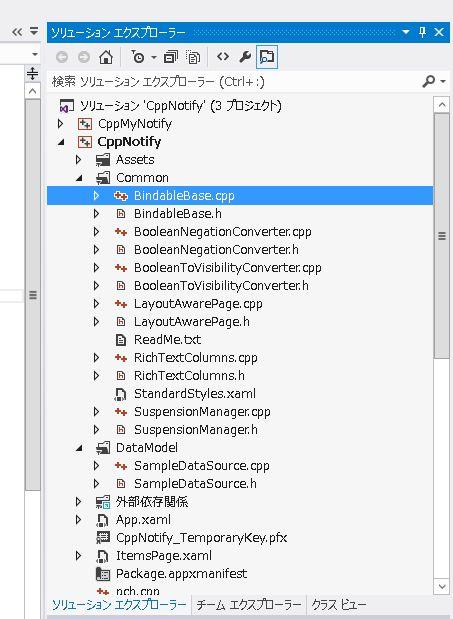
metro application で grid のテンプレートを開くと、Common というフォルダが作られて、その中に ListView を使った mvvm の実装があります。WPF, Siverlight と実装が異なるので、覚え直しになるのか?とうことと、このクラスを使って実装して良いのか?ということがあるのですが、今後なし崩しに活用されそうな予感はします。
Visual Studio 2012 RCのMetro スタイル アプリのテンプレートを見てみる – かずきのBlog@Hatena
http://d.hatena.ne.jp/okazuki/20120604/1338821522
のところを参照にして、
・SampleDataSource.h
・SampleDataSource.cpp
・BindableBase.h
・BindableBase.cpp
だけ見ていきます。構造は、C# と一緒です。
■SampleDataSource.h
/// <summary>
/// Base class for <see cref="SampleDataItem"/> and <see cref="SampleDataGroup"/> that
/// defines properties common to both.
/// </summary>
 [Windows::Foundation::Metadata::WebHostHidden]
 [Windows::UI::Xaml::Data::Bindable]
public ref class SampleDataCommon : CppNotify::Common::BindableBase
{
internal:
	SampleDataCommon(Platform::String^ uniqueId, Platform::String^ title, Platform::String^ subtitle, Platform::String^ imagePath,
		Platform::String^ description);

public:
	void SetImage(Platform::String^ path);

	property Platform::String^ UniqueId { Platform::String^ get(); void set(Platform::String^ value); }
	property Platform::String^ Title { Platform::String^ get(); void set(Platform::String^ value); }
	property Platform::String^ Subtitle { Platform::String^ get(); void set(Platform::String^ value); }
	property Windows::UI::Xaml::Media::ImageSource^ Image { Windows::UI::Xaml::Media::ImageSource^ get(); void set(Windows::UI::Xaml::Media::ImageSource^ value); }
	property Platform::String^ Description { Platform::String^ get(); void set(Platform::String^ value); }

private:
	Platform::String^ _uniqueId;
	Platform::String^ _title;
	Platform::String^ _subtitle;
	Windows::UI::Xaml::Media::ImageSource^ _image;
	Platform::String^ _imagePath;
	Platform::String^ _description;
};
ListView の Item を制御するところで、実際には SampleDataCommon を継承して SampleDataItem を作っています。
実際の Notify のところは、BindableBase クラスで実装されています。
C++/CX なのでプロパティは「property」を使って作れます。
■SampleDataSource.cpp
SampleDataCommon::SampleDataCommon(String^ uniqueId, String^ title, String^ subtitle, String^ imagePath, String^ description)
{
	_uniqueId = uniqueId;
	_title = title;
	_subtitle = subtitle;
	_description = description;
	_imagePath = imagePath;
	_image = nullptr;
}

String^ SampleDataCommon::UniqueId::get()
{
	return _uniqueId;
}

void SampleDataCommon::UniqueId::set(String^ value)
{
	if (_uniqueId != value)
	{
		_uniqueId = value;
		OnPropertyChanged("UniqueId");
	}
}
御馴染みの OnPropertyChanged 呼び出しが、プロパティの set メソッドの中にあります。
OnPropertyChanged に渡すのは、C# と同じように文字列ですね。細かいことですが、C++/CX の場合は Platform::String になります。
■BindableBase.h
/// <summary>
/// Implementation of <see cref="INotifyPropertyChanged"/> to simplify models.
/// </summary>
 [Windows::Foundation::Metadata::WebHostHidden]
public ref class BindableBase : Windows::UI::Xaml::Data::INotifyPropertyChanged
{
public:
	virtual event Windows::UI::Xaml::Data::PropertyChangedEventHandler^ PropertyChanged;

protected:
	virtual void OnPropertyChanged(Platform::String^ propertyName);
};
BindableBase の中身は簡単で、Model からプロパティ更新を受け取るための OnPropertyChanged と、XAML に更新通知をするための PropertyChanged だけです。C# にある SetProperty 相当のものはありません。ちなみ、「Model が更新通知用のメソッドを呼び出す」ので「OnPropertyChanged」じゃなくて「RaisePropertyChanged」とか「ChangeProperty」とかのほうが良い気がするのですが、どうなんでしょう?いくつかの mvvm 用のサンプルを探すと OnPropertyChanged になっているので、それを踏襲した模様です。
■BindableBase.cpp
/// <summary>
/// Notifies listeners that a property value has changed.
/// </summary>
/// <param name="propertyName">Name of the property used to notify listeners.</param>
void BindableBase::OnPropertyChanged(String^ propertyName)
{
	PropertyChanged(this, ref new PropertyChangedEventArgs(propertyName));
}
実装のほうも簡単で、プロパティの「文字列」を受け取って、PropertyChanged を実行しているだけです。この PropertyChanged は、XAML 側から登録されるものです。プロパティ名を直接渡さずに、PropertyChangedEventArgs で包むところが冗長な気がしますが(特に ref new になっているところ)、引数の型を固定したかったなのかもしれません。
■少し楽をするためにマクロを書く
という訳で、プロパティの set/get を書くところは mvvm でおなじみのところです。C# では、CallerMemberName という属性がありますが、C++/CX の場合はありません。理由はよくわかりません。
さて、ここの get/set を書くのは結構面倒です。まあ、T4 を使ってテンプレート化してしまっても良いのですが、C++/CX の場合は C/C++ 系列としてマクロを使う方法があります。
#define PROPERTY( _t, _m )				\
private:								\
	_t m_##_m;							\
public:									\
	property _t _m {					\
		_t get() { return m_##_m; }		\
		void set( _t value ) {			\
			if ( m_##_m != value ) {	\
				m_##_m = value;			\
				OnPropertyChanged( #_m ); \
		}}}
これを使って、SampleDataSource.cpp を書き換えます。
/// <summary>
/// Base class for <see cref="SampleDataItem"/> and <see cref="SampleDataGroup"/> that
/// defines properties common to both.
/// </summary>
 [Windows::Foundation::Metadata::WebHostHidden]
 [Windows::UI::Xaml::Data::Bindable]
public ref class SampleDataCommon : CppNotify::Common::BindableBase
{
internal:
	SampleDataCommon(Platform::String^ uniqueId, Platform::String^ title, Platform::String^ subtitle, Platform::String^ imagePath,
		Platform::String^ description);

public:
	void SetImage(Platform::String^ path);

	PROPERTY( Platform::String^, UniqueId );
	PROPERTY( Platform::String^, Title );
	PROPERTY( Platform::String^, Subtitle );
	// PROPERTY( Windows::UI::Xaml::Media::ImageSource^, Image );
	property Windows::UI::Xaml::Media::ImageSource^ Image { Windows::UI::Xaml::Media::ImageSource^ get(); void set(Windows::UI::Xaml::Media::ImageSource^ value); }
	PROPERTY( Platform::String^, Description );
private:
	Windows::UI::Xaml::Media::ImageSource^ _image;
	Platform::String^ _imagePath;
};
private なメンバが「m_Title」のようにプロパティ名にプレフィックスが付いた形式になってしまいますが、これで良いかと。
Image プロパティの場合は、_imagePath との絡みもあるので、別途定義になっています。
■OnPropertyChangedに渡すパラメータを文字列以外にしたい。
これを踏まえて、C++のパターンと、C++/CX の別のパターンと考えていこうという訳です。
関数ポインタを使うか、自動な enum を使うか、という形で文字列を使わないように作り変えます。

ピンバック: c++/cx metro の場合 mvvm がどのように実装されているか | Moonmile Solutions Blog | S.F.Page