
いつからできるようになったんだっけ?
Petzold Book Blog – Writing Xamarin.Forms Apps in F#
http://www.charlespetzold.com/blog/2015/10/Writing-Xamarin-Forms-Apps-in-FSharp.html
なところなので、実は随分前からある。
で、Visual Studio for Mac の「Blank Forms App」で F# が選べるようになっていたので試してみる。ちなみに、Windows のほうの Visual Studio 2017 には F# のテンプレートがないので、Mac で作ったものを Windows 側にコピーしている。
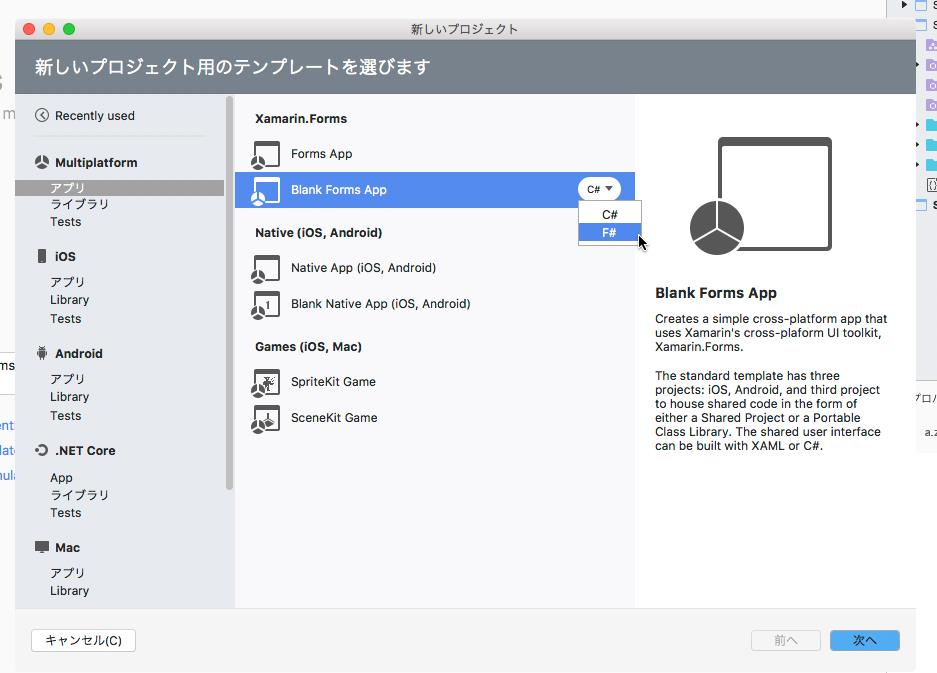
テンプレートが少しおかしいらしく、Android のほうの Xamarin.Forms が入らない(入れようとしてエラーになっている)ので手動で入れる。

Mac のほうで作るので UWP のプロジェクトはない。
きちんと *.xaml があるので、XAML がロードできる。
type SampleXFormsFPage() =
    inherit ContentPage()
    let xaml = base.LoadFromXaml(typeof<SampleXFormsFPage>)
C# だと、自動生成された *.g.cs ファイルにLoadFromXamlがあって、内部的にクラスとXAMLをマッチングさせる。で、F# の場合は *.g.fs を生成しないので、これを直接使うという訳。
いわゆる x:Name がプロパティにマッピングされないので、自前で FindByName を呼び出す。OnAddメソ\ッドは、動的にリフレクションを使っているのか、AddHandler を使わずにマッピングされる。UWP の場合は、Click に対応するイベントコードが生成されるが、Xamarin.Forms の場合は、イベントが生成されないのでビルド時にはチェックされず、実行時に対応するイベントがないと例外が発生する。これは C# も F# も同じ。
namespace SampleXFormsF

open Xamarin.Forms
open Xamarin.Forms.Xaml
open System

type TodoItem() =
    member val Id = "" with get, set
    member val Name = "" with get, set
    member val Done = false with get, set

type SampleXFormsFPage() =
    inherit ContentPage()
    let _ = base.LoadFromXaml(typeof<SampleXFormsFPage>)
    let todoList = base.FindByName<ListView>("todoList")
    let newItemName = base.FindByName<Entry>("newItemName")
    let items = new System.Collections.ObjectModel.ObservableCollection<TodoItem>()

    do
        todoList.ItemsSource <- items

    override this.OnAppearing() =
        base.OnAppearing()

    member this.OnAdd( sender : obj, e : EventArgs ) =
            let item = new TodoItem()
            item.Id <- Guid.NewGuid().ToString()
            item.Name <- newItemName.Text
            items.Add( item )

    member this.OnSelected( sender : obj, e : SelectedItemChangedEventArgs ) = ()
    member this.OnRefresh( sender : obj, e : EventArgs ) =  ()
    member this.OnComplete( sender : obj, e : EventArgs ) =  ()
XAML はこんな感じ。もともと、Mobile App のクイックスタートのコードを持ってきているので、後から Azure に対応させる。
<?xml version="1.0" encoding="utf-8"?>
<ContentPage xmlns="http://xamarin.com/schemas/2014/forms" xmlns:x="http://schemas.microsoft.com/winfx/2009/xaml" xmlns:local="clr-namespace:SampleXFormsF" x:Class="SampleXFormsF.SampleXFormsFPage">
    <Grid RowSpacing="0">
        <Grid.RowDefinitions>
            <RowDefinition Height="Auto" />
            <RowDefinition Height="*" />
        </Grid.RowDefinitions>
        <ActivityIndicator Grid.RowSpan="2" HorizontalOptions="Center" VerticalOptions="Center" IsVisible="False" IsEnabled="True" x:Name="syncIndicator"/>
        <StackLayout Grid.Row="0" BackgroundColor="#5ABAFF" Padding="10,30,10,5">
            <Label TextColor="#555555" Text="Azure App Service" />
            <Grid>
                <Grid.ColumnDefinitions>
                    <ColumnDefinition/>
                    <ColumnDefinition Width="Auto"/>
                </Grid.ColumnDefinitions>
                <Entry x:Name="newItemName" Placeholder="Item name" />
                <StackLayout x:Name="buttonsPanel" Grid.Column="1" Orientation="Horizontal" HorizontalOptions="StartAndExpand">
                    <Button Text="+" MinimumHeightRequest="30" Clicked="OnAdd" />
                </StackLayout>
            </Grid>
        </StackLayout>
        <ListView x:Name="todoList" ItemSelected="OnSelected" IsPullToRefreshEnabled="true" Refreshing="OnRefresh" Grid.Row="1">
            <ListView.ItemTemplate>
                <DataTemplate>
                    <ViewCell>
                        <ViewCell.ContextActions>
                            <MenuItem Clicked="OnComplete" Text="Complete" CommandParameter="{Binding .}"/>
                        </ViewCell.ContextActions>
                        <StackLayout HorizontalOptions="StartAndExpand" Orientation="Horizontal" Padding="15,5,0,0">
                            <StackLayout Padding="5,0,0,0" VerticalOptions="StartAndExpand" Orientation="Vertical">
                                <Label Text="{Binding Name}" />
                            </StackLayout>
                        </StackLayout>
                    </ViewCell>
                </DataTemplate>
            </ListView.ItemTemplate>
        </ListView>
    </Grid>
</ContentPage>
実行してみる

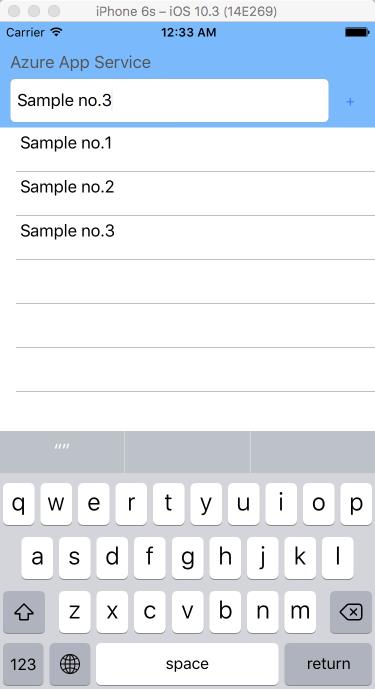
ちなみに、フロントが C# でも良いならば、適当な UWP プロジェクトを取ってきて、F# の PCL を参照設定することで動作できる。