オレオレ MVC を作ってみる(1) | Moonmile Solutions Blog
http://www.moonmile.net/blog/archives/1861
前回のコードを少し変更して wordpress のカテゴリ一覧とカテゴリ内の記事を表示させます。
■最初の index.php
まずは、クラス名とメソッドを取り出す index.php から。
<html>
<head>
<meta http-equiv="Content-Type" content="text/html; charset=UTF-8"/>
</head>
<body>
<?php
$url = $_GET['url'];
$url = strtolower($url);

$vars =  preg_split('|/|',$url);
$params = array();
if ( count($vars) == 1 ) {
	$base = $url;
	$method = "index";
} else if ( count($vars) == 2 ) {
	$base = $vars[0];
	$method = $vars[1];
} else {
	$base = $vars[0];
	$method = $vars[1];
	for($i=2; $i<count($vars); $i++ ) {
		$params[] = $vars[$i];
	}
}
$classfile = $base."_controller.php";
$classname = strtoupper(substr($base,0,1)).substr($base,1).'Controller';

echo "classfile: $classfile<br/>";
echo "classname: $classname<br/>";
echo "method: $method<br/>";
echo "param: ";print_r($params); echo "<br/>";

include('controllers/'.$classfile);
$c = new ReflectionClass($classname);
$obj = $c->newInstance();
$method = $c->getMethod($method);
$method->invokeArgs($obj,$params);
?>
</body>
GET で送られる URL から「/」でパースするところは同じで、メソッドのパラメータを受けれるようにします。これの難点は常に body タグ内に view のコードが入ってしまうことですよね。一旦他のレンダリングに任せて、その中で view のコードを呼ぶようにしないと、head タグなどが書き出せません。
■ビューを作る
<!-- views/categories/item.php -->
<h1>カテゴリ一内の記事</h1>
<table>
	<tr>
		<th>Post.id</th>
		<th>Post.post_title</th>
		<th>User.display_name</th>
		<th>Post.post_date</th>
		<th>Post.guid</th>
	</tr>
	<?php foreach($Categories as $item) : ?>
	<tr>
		<td><?php echo $item['Post']['id']; ?></td>
		<td><?php echo $item['Post']['post_title']; ?></td>
		<td><?php echo $item['User']['display_name']; ?></td>
		<td><?php echo $item['Post']['post_date']; ?></td>
		<td><?php echo $item['Post']['guid']; ?></td>
	</tr>
	<?php endforeach; ?>
</table>
ビューの作りは CakePHP の *.ctp と同じ。このあたりは互換が保てて楽ちん。
■コントローラーを作る
<?php
include 'models/category.php';
class CategoriesController {
	var $name = 'CategoriesController';
	function index() {
		// view に渡す変数
		global $Categories;
		// モデルを作成して
		$category = new Category();
		// 検索
		$Categories = $category->find('all');
		include('views/categories/index.php');
	}
	function item($slug) {
		// view に渡す変数
		global $Categories;
		// モデルを作成して
		$category = new Category();
		// 検索
		$Categories = $category->findBySlug($slug,10);
		include('views/categories/item.php');
	}
}
?>
コントローラーは、モデルを new してからメソッドを呼ぶだけ。最後に view をインクルードして表示ってな具合です。この include 部分を変えて index.php との連携を取らないといけませんね。
■モデルの基底クラスを作る
モデルの基底クラスを作りました。
<?php
class Model {
	var $cn ;
	function open() {
//		$this->cn = new PDO("mysql:host=127.0.0.1;dbname=moonmile_cake",
//			"moonmile_cake","cakephp");
		$this->cn = new PDO("mysql:host=127.0.0.1;dbname=wordpress",
			"wordpress","wordpress");
	}
	function close() {
		$this->cn = null;
	}
	function query($sql) {
		$this->open();
		$results = $this->cn->query($sql);
		$this->close();
		return $this->toArray($results);
	}
	function toArray($stmt) {
		$items = array();
		foreach($stmt as $item) {
			foreach($item as $key => $value) {
				if (strpos($key,'.') == true ) {
					list($table,$column) = split('\.',$key);
					$tables[$table][$column] = $value;
				}
			}
			$items[] = $tables;
		}
		return $items ;
	}
}
?>
ひとまず、データベースの open と close は、ここから継承することにすると。後、クエリを実行した後で配列に直すのが前回はださかったので、toArray メソッドを作って自動化します。こうすることで、Term.term_id のような名前をクエリで付けておけば $item[‘Term’][‘term_id’]のように参照ができます。
■モデルを作る
この基底クラスを継承して Category モデルクラスを作ります。
<?php
require('lib/model.php');

class Category extends Model {
	var $name = 'Category';
	function find($type) {
		$sql = <<< HERE
select
	Term.term_id	`Category.term_id`,
	Term.name		`Category.name`,
	Term.slug		`Category.slug`
from
	wp_terms as Term
  	inner join wp_term_taxonomy as TermTaxonomy
  	on ( Term.term_id = TermTaxonomy.term_id )
WHERE
	TermTaxonomy.taxonomy = 'category'
	order by Term.term_id
;
HERE;
		$items = $this->query($sql);
		return $items ;
	}

	function findBySlug($slug,$max) {
		$sql = <<< HERE
select
	Post.ID				`Post.id`,
	Post.post_title		`Post.post_title`,
	User.display_name	`User.display_name`,
	Post.post_date		`Post.post_date`,
	Post.guid			`Post.guid`
from
	wp_terms as Term
  	inner join wp_term_taxonomy as TermTaxonomy
  	on ( Term.term_id = TermTaxonomy.term_id )
	inner join wp_term_relationships as TermRelationship
	on ( TermTaxonomy.term_taxonomy_id = TermRelationship.term_taxonomy_id )
	inner join wp_posts as Post
	on ( TermRelationship.object_id = Post.ID )
  inner join wp_users as User
  on ( Post.post_author = User.ID )
WHERE
	TermTaxonomy.taxonomy = 'category'
AND Post.post_status = 'publish'
AND Term.slug = '$slug'
	order by Post.post_date desc
	limit $max ;
HERE;
		$items = $this->query($sql);
		return $items ;
	}
}
?>
完全にクエリを書くということで、非自動化 O/R マッピングッ!!! SQL を分かっている場合はこれでも十分かなぁと。下手に Model::$belongsTo 等で悩むよりは、と考えてしまいます。
余談ですが、CakePHP のアソシエーションは、LINQ to Entities のアソシエーションのようにグラフィカルかつダイアログ等で入力してから、コードに直してやれば良いかと思っています。LINQ to Entities の設定って XML ファイルに書き出されるので、同様に CakePHP のアソシエーションを XML に設定しておいて読み込ませるってこともできますね。
このオレオレ MVC の O/R マッピングは完全に SQL 文を書くしかない体制なので、この部分をコピー&ペーストして MySQL Workbench で実行してチェックってことになります。なので、inner join を使ってきっちり結合させます。
■実行してみる
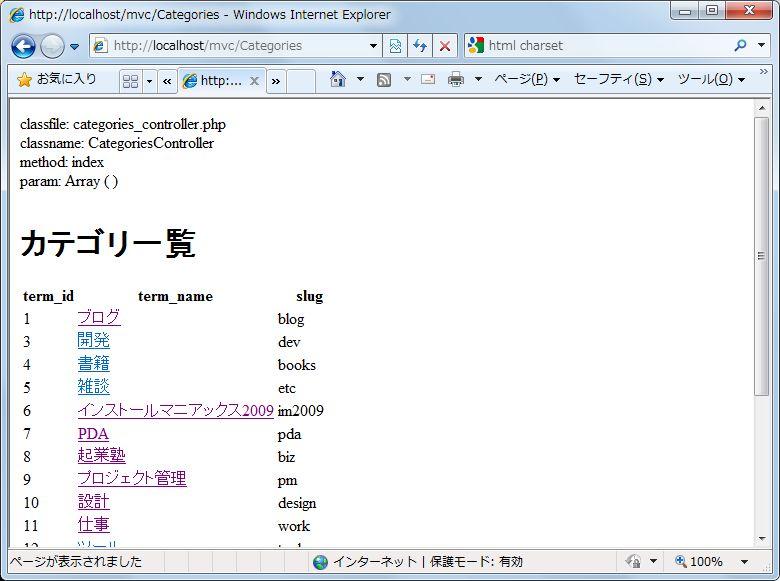
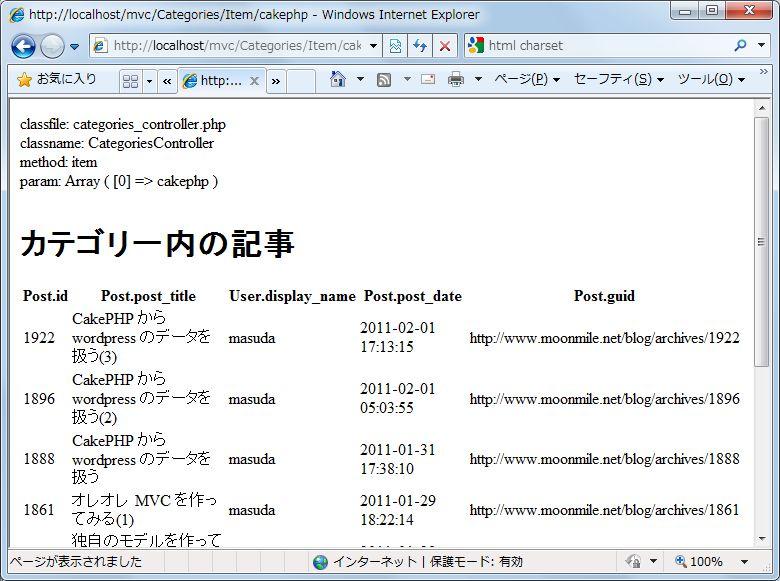
これだけのコードで MVC が実現できます(非常にチープですが)。
▼カテゴリ一覧
▼カテゴリ内の記事
まぁ、これだとリストの表示しかできないので、お次は insert, update, delete ですね。いや、その前にレイアウト読み込みをさせないと。